October 28, 2026 · CHARIS BACHTSEVANI

#devlog #vtt #tools #announcement

From the Phone to the Tabletop: VTT Maps and Everything Else in 4.38.1 and 4.38.2

Versions 4.38.1 and 4.38.2 are out, and this time the maps leave the phone.

After 4.38 came out, Fantasy Grounds players asked us for three things. The first was a map that carries its own walls, so nobody has to trace them again on a virtual tabletop. The second was one picture for the players and another for the GM, and the third was WEBP, so a floor plan doesn't cost megabytes to send. 4.38.1 does all three. Around them sit three new tools (Games of Chance, Bill of Fare and Interiors), a tour for the Timeline Maker, a window that tells you what changed, and a handful of fixes. 4.38.2 adds a fourth tool, Treasure Hoards, for what the party finds when they open the chest, gives the Random Dungeon's Export button the same VTT file, and puts a Reset button on every Filters sheet. This post goes through all of it, starting at the tabletop.

4.38.1 and 4.38.2 at a Glance

New in 4.38.2

  • Treasure Hoards: what the party finds in the chest, in fantasy, sci-fi and 1920s horror, from coin and valuables to named legends, with a GM switch for what the players don't see.
  • The Random Dungeon's Export: VTT beside PNG and WEBP, saved wherever you choose.
  • Reset: every Filters sheet has a Reset button next to Apply.
  • Passengers: in Trade & Cargo, one or two passengers on a run say who they are and why they are travelling.
  • And: the hub's longer explanations in paragraphs, What's new with a tab for every version, and a Bestiary fix.

New in 4.38.1

  • VTT maps: Taverns & Hubs, Mystery, Interiors and the Random Dungeon share a floor as a Universal VTT file, with its walls, doors and grid.
  • Two pictures: one floor or every floor, as the players' plan and as the GM's blueprint with the rooms named and the secrets marked.
  • WEBP at 75%: every picture the app exports can be a WEBP, a fraction of a PNG's size. Save PNG is now called Export.
  • Games of Chance: the games from Taverns & Hubs in a tool of their own, with a GM switch for the cheat.
  • Bill of Fare: the menus from Taverns & Hubs in a tool of their own, priced in pips.
  • Interiors: the inside of a building as a keyed map, from Mystery's 36 buildings to nine new shops and their stock.
  • Favourites: games, menus and buildings get lists of their own and go back to their tool to be changed.
  • What's new: the app lists what changed, once, the first time you open an update.
  • Fixes: locks and menus in Taverns & Hubs, the GM tag at large text, TalkBack in Mystery, and a heart for Map Maker.

Your saves: everything you saved opens exactly as it did, after either update.

From the Phone to the Tabletop

Share in Taverns & Hubs, Mystery and Interiors opens a popup called Export the floor plan, and the first thing it asks is the format: PNG, WEBP or VTT. VTT is the new one. It writes a Universal VTT file, one for each floor, holding the floor's picture, its grid, every wall as a wall that blocks sight and every door as a door that opens and shuts. Fantasy Grounds Unity imports the file directly, and Foundry and Roll20 read it through an importer add-on, so you place the map instead of drawing it again.

For this post we rolled Under the Bearded Knight, a tavern in a port, on three floors. The cellar floor "is flagged with old tombstones, the names worn smooth except one, which is the owner's", and with GM on it has a hidden room (22) and a tunnel (23). Its VTT file is 15 by 12 squares at 128 pixels a square, with 18 walls and one door. A square is 1.5 metres, which plays as the usual 5 feet.
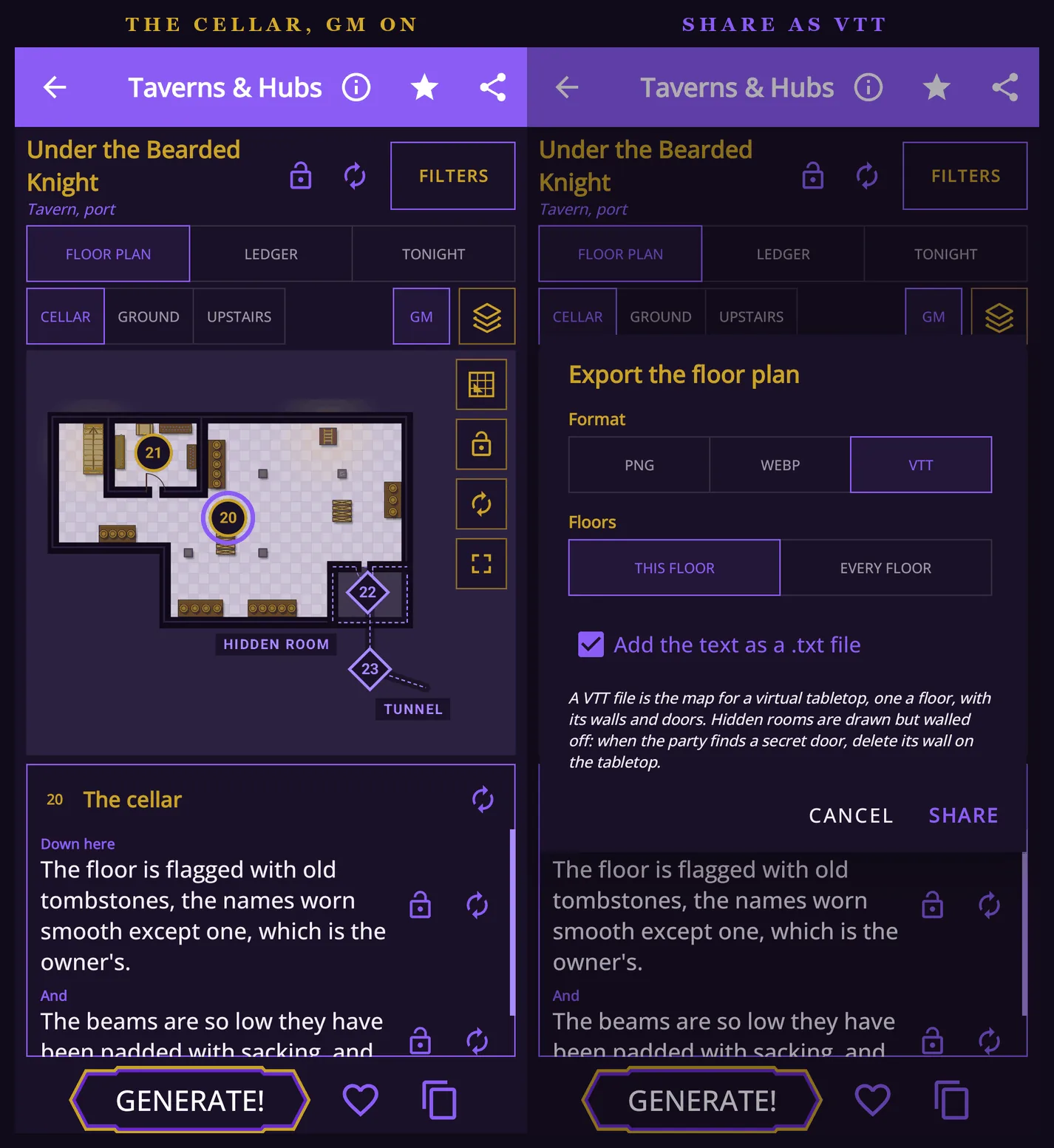
The cellar of Under the Bearded Knight in Taverns & Hubs with GM on, its hidden room and tunnel marked, beside the Export the floor plan popup set to VTT. The cellar with GM on, and its Share set to VTT.

The popup says what happens to the secrets: "Hidden rooms are drawn but walled off: when the party finds a secret door, delete its wall on the tabletop." The picture inside the file is the players' plan, with no pins and no names, and the hidden room drawn behind a wall that comes out when the party earns it. Windows block sight as the wall around them does, and the lighting is left to the tabletop.

In Fantasy Grounds

We took the files into Fantasy Grounds Unity through the Images window's Import button. A sleeper train from Mystery came in with all 145 of its walls and 37 doors where the plan draws them, and a tavern from Taverns & Hubs with its 26 walls and 7 doors. With line of sight on, a token in the tavern's hall sees the hall and nothing past its walls. Open a door and its sight runs through into the room behind.
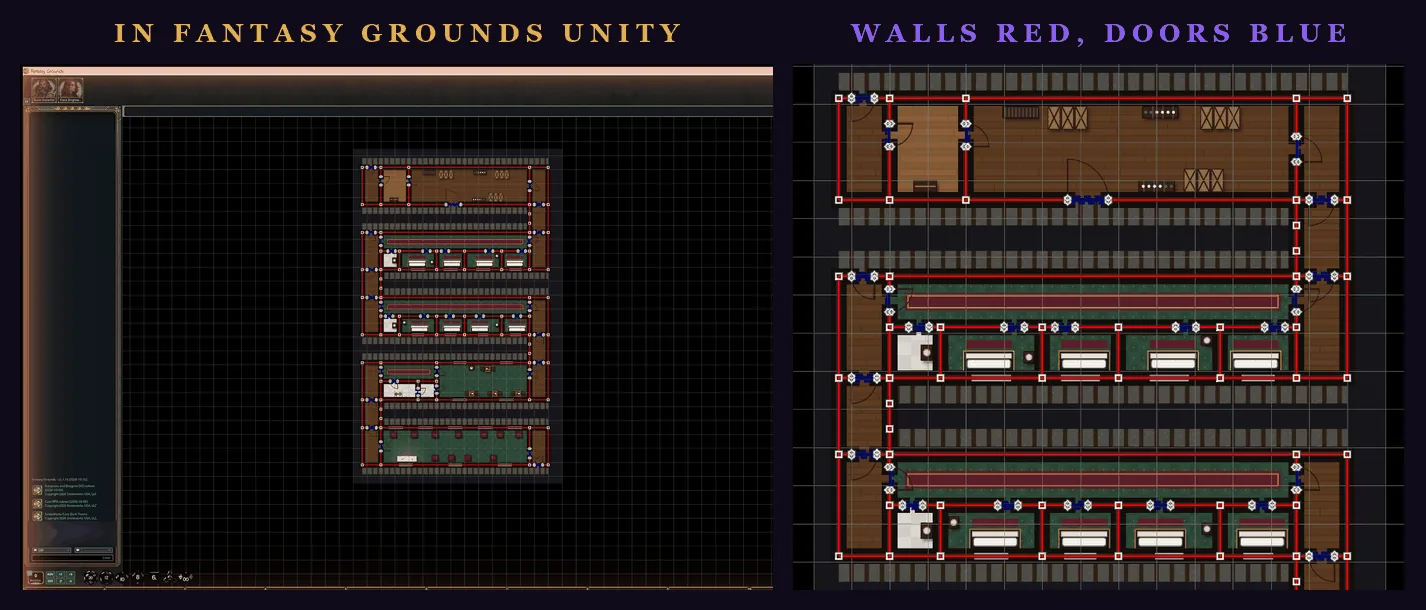
A sleeper train from Mystery in a Fantasy Grounds Unity campaign, beside a close view of its carriages with the walls drawn in red and the doors in blue. A sleeper train from Mystery in Fantasy Grounds Unity, and a closer look at its walls and doors.
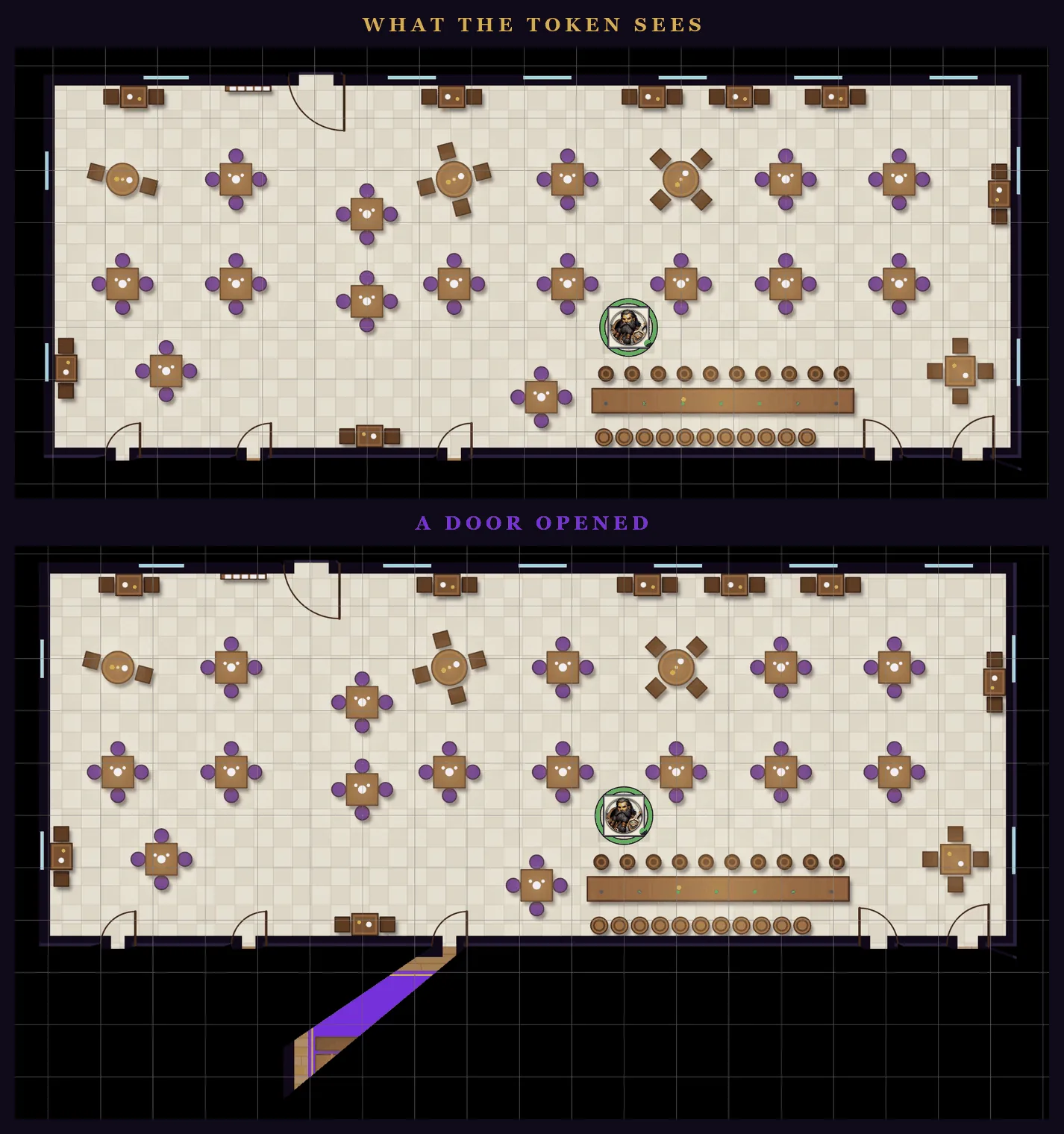
A tavern hall in Fantasy Grounds with line of sight on: first only the hall around the token is visible, then a door is opened and the room behind it comes into view. A tavern hall with line of sight on, and the same hall with one door opened.

The Random Dungeon makes a VTT file too, with the dungeon's walls and doors and the room numbers left off the picture. Its Share asks every time, PNG, WEBP or VTT, and sends the room key alongside as text. In 4.38.2 its Export button offers the same three. Pick VTT and the phone's own Save dialog opens, so the file goes wherever you choose instead of into a message. It is the same file Share sends. A dungeon we saved this way came to 41 by 31 squares, with 342 walls and 49 doors.
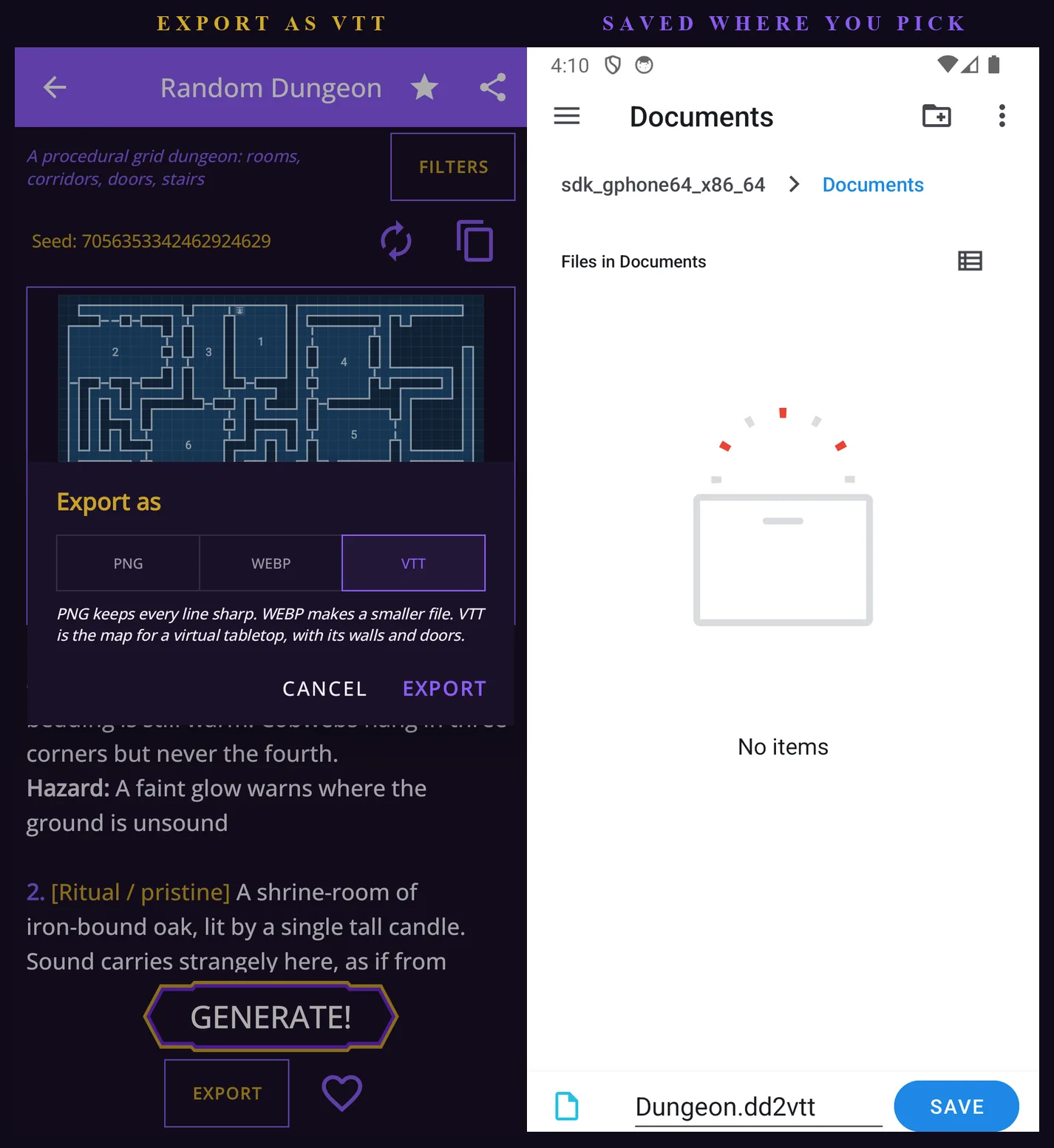
The Random Dungeon's Export as popup offering PNG, WEBP and VTT, set to VTT, beside the phone's Save dialog open on an empty Documents folder with the file named Dungeon.dd2vtt. Export set to VTT, and the Save dialog it opens.

A Picture for the Players, One for the GM

Not every table plays on a virtual tabletop. Set the same popup to PNG or WEBP and it sends pictures instead: the players' picture, the GM's, or both, of this floor or every floor. The players' picture is the plan alone, with nothing on it the players shouldn't see. The GM's is the blueprint, with every room named, the hidden rooms, secret doors and tunnels drawn in, and a numbered pin at every spot.

The two pictures are the same size, so they line up exactly, and the text goes with them. The GM's text is numbered by pin, so "20. The cellar", "21. The vault" and "22. The hidden room (GM)" match the map. Tick Add the text as a .txt file and it travels as a file as well, for the apps that keep pictures and drop the message.
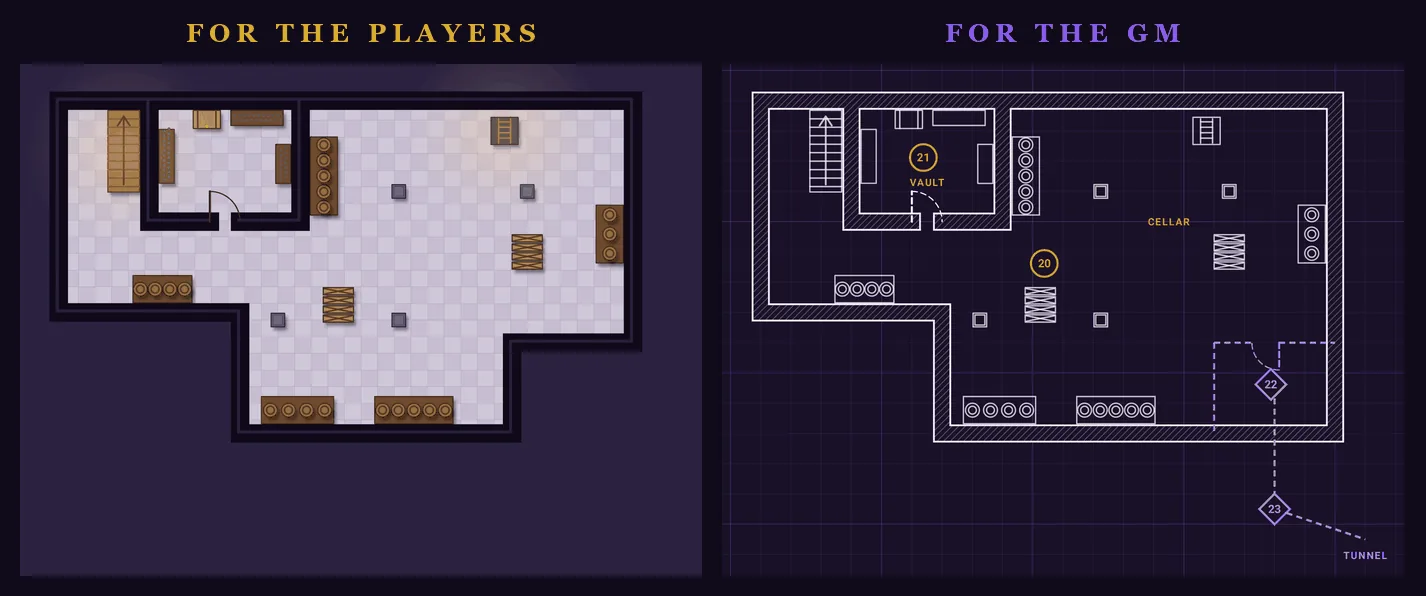
The cellar of Under the Bearded Knight as the players' picture, a plain floor plan, beside the GM's picture, a blueprint naming the vault and the cellar and showing the hidden room 22 and the tunnel 23. The same cellar twice: the players' picture, and the GM's with the vault, the hidden room and the tunnel.

Smaller Files: WEBP at 75%

Every picture the app exports can now be a PNG or a WEBP. The Export button on the map tools (it said Save PNG until now) and Share on every map screen ask which one you want. "PNG keeps every line sharp. WEBP makes a smaller file." Tick Remember my choice and they stop asking. Settings has the same choice under Image format, where Ask each time brings the question back. The Random Dungeon, whose Export and Share also offer VTT, asks every time.
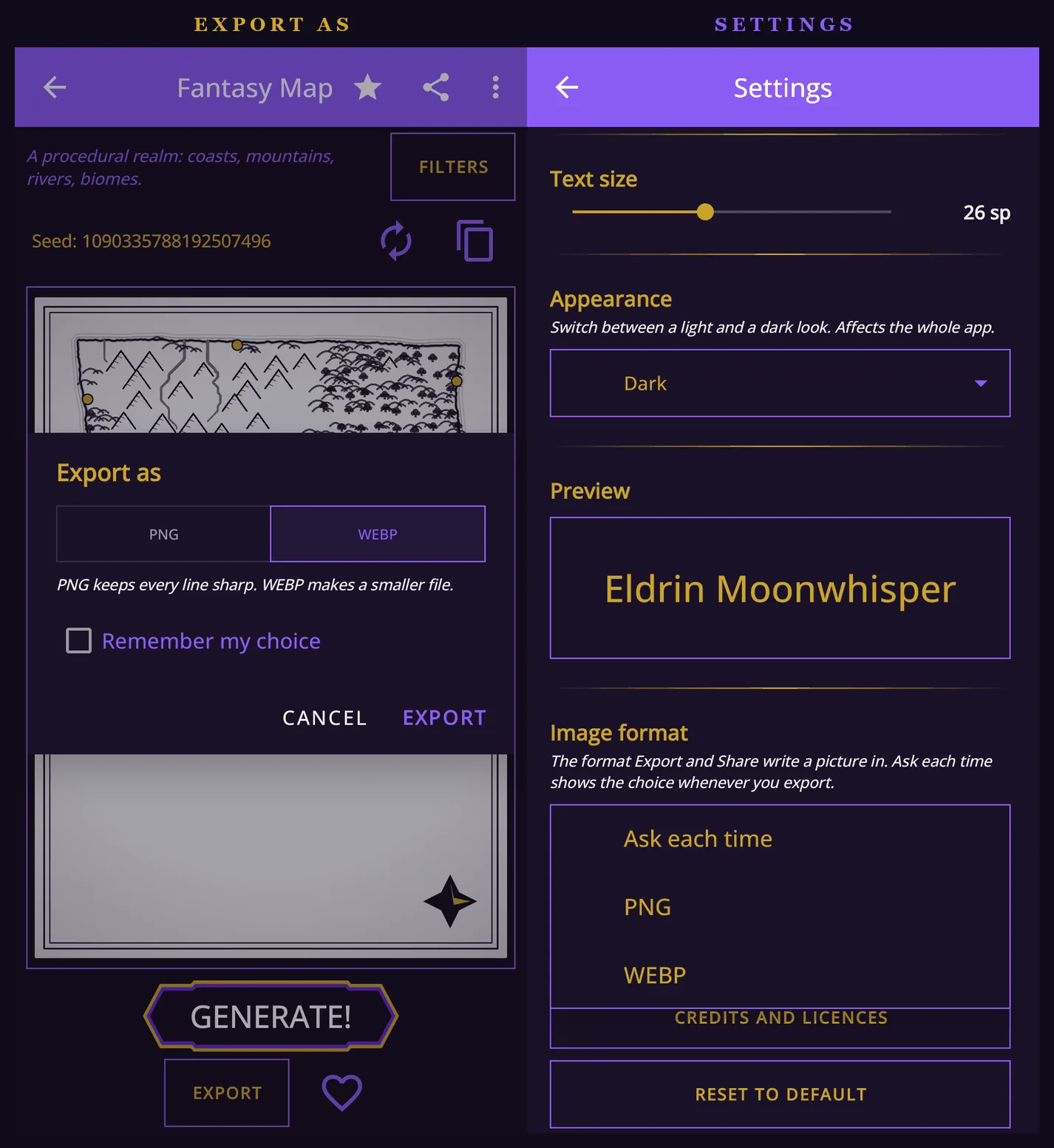
The Export as popup on the Fantasy Map offering PNG or WEBP with Remember my choice, beside the Image format setting in Settings open on Ask each time, PNG and WEBP. Export as on the Fantasy Map, and the Image format setting.

The difference in size is large. The cellar's players' picture came to 340 KB as a PNG and 33 KB as a WEBP, and the GM's to 311 KB and 73 KB. A whole Fantasy Map, 2928 by 4096 pixels, was 2.3 MB as a PNG and 0.4 MB as a WEBP, and side by side at full size the two are hard to tell apart.
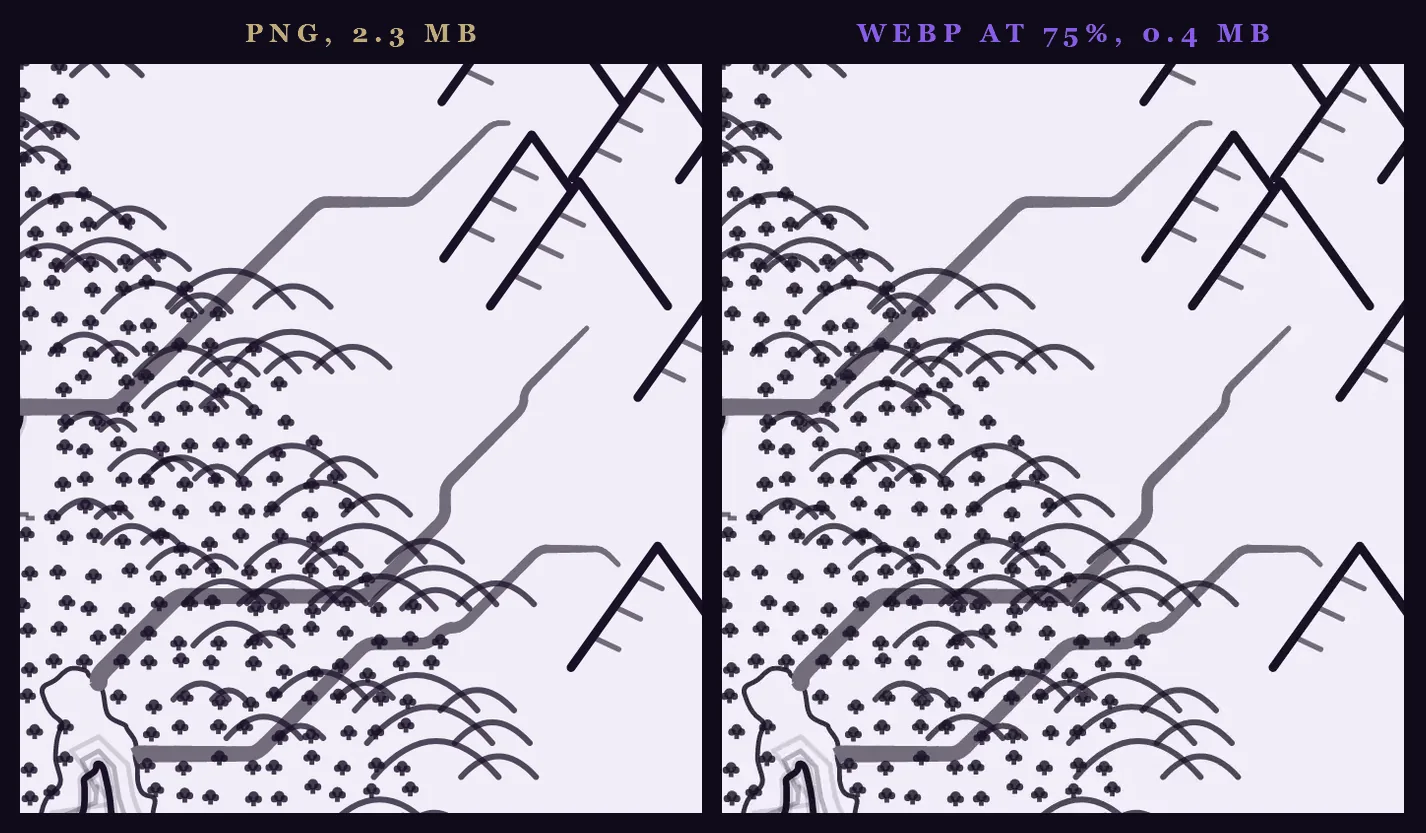
The same corner of the same Fantasy Map at full size, with its mountains, forest and rivers, saved as a 2.3 MB PNG and as a 0.4 MB WEBP. The same corner of one Fantasy Map at full size: the PNG on the left, the WEBP on the right.

Treasure Hoards

The newest tool, in 4.38.2, is Treasure Hoards, in the Generators Hub with a NEW badge. Press Generate and you get what the party finds when they open the chest: whose it was, where it lay and what holds it, what lies on top, what a search turns up beneath it, and what only the GM knows is hidden. Money and valuables are priced in pips, from bronze to diamond. Items carry a rarity, from common to unique, and the rarer an item is, the more there is to it, up to legends with names of their own.

For this post we asked for a dragon's vault in its lair and rerolled until a legend turned up. What the dragon sleeps on was "Heaped across a cavern floor among bones": a bale of fine furs, lynx and marten, "A star sapphire as big as a quail's egg", a dozen gold ingots stamped with a crown, a pile of heavy coins from a lost empire and "A glaive with a blade like a scythe", Legendary. Beneath it, for a search, lay a ruby necklace "once worn at a royal wedding" and "The eye of an idol, a single huge sapphire".

The GM switch decides who the hoard is for. With GM off it is the players' hoard: the glaive shows only what they can see of it, "It is perfectly silent, even when struck". With GM on it has its name, Quietus, Dread of the Deep Roads, and the rest of its story. Its power is that "Stone gives way to it as easily as cloth". It was "Lost under a lake for a lifetime, then found by a child", and every use has a price: "Each use takes a memory its bearer loved". GM also shows the catch, "The dragon will count it again tonight", and who comes looking, "A rival thief with a forged claim". Copy and Share leave the GM's lines out until GM is on.
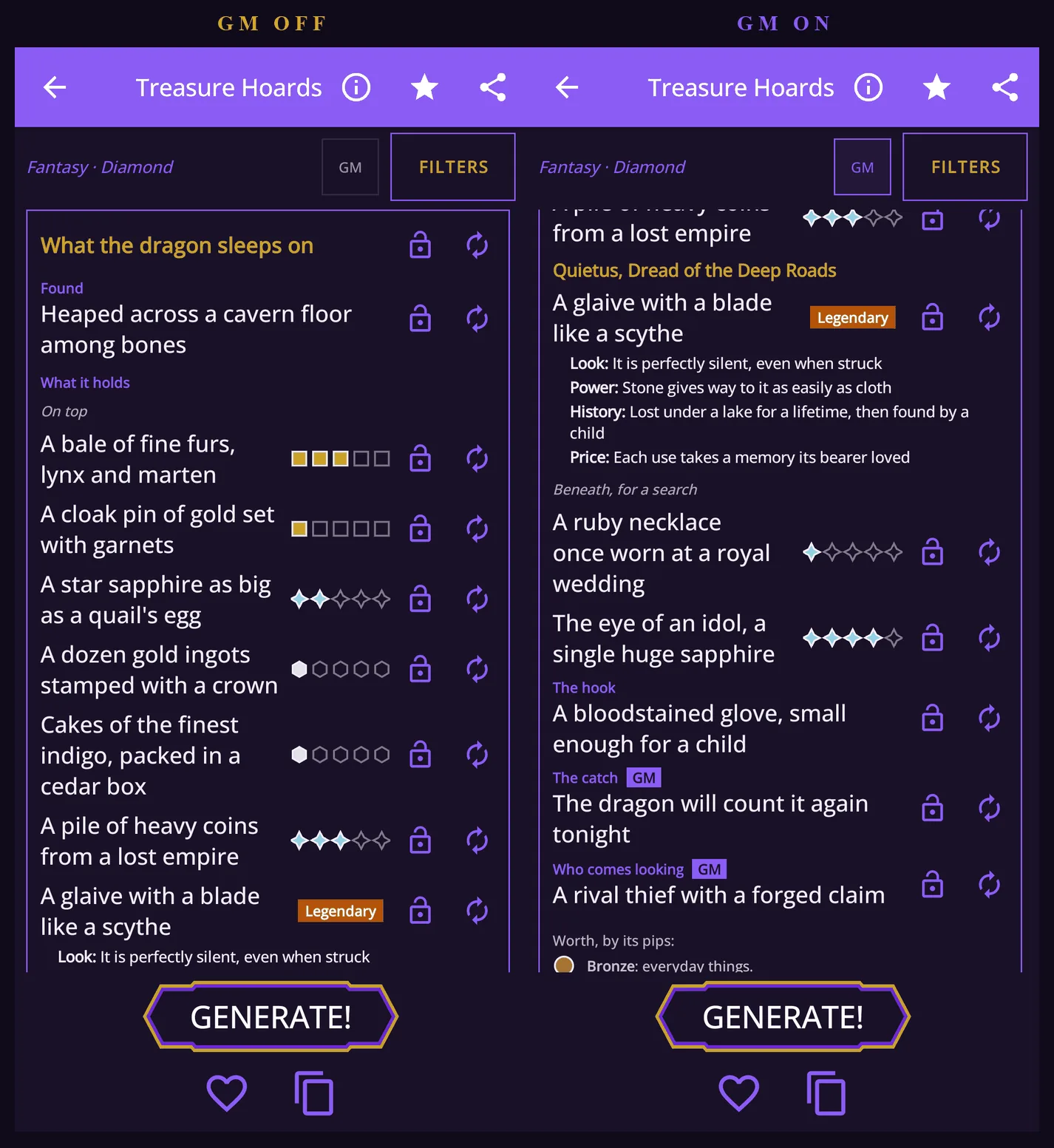
What the dragon sleeps on in Treasure Hoards with GM off, its valuables with their pips and a Legendary glaive showing only its look, beside the same hoard with GM on, the glaive named Quietus, Dread of the Deep Roads with its power, history and price, and the catch and who comes looking below. A dragon's hoard with GM off, and with GM on.

Filters choose the genre and what the hoard is. You can pick whose it was (in fantasy a thief, a dead adventurer, brigands, a dragon, goblins, a noble house, a temple, a merchant or an ancient ruler) and where it lay: on a body, in a lair, in a building, in a ruin, aboard, buried or sunk. You can also pick how much (a pocketful, a stash, a chest or a vault), what it rewards (a skirmish, a dungeon level, a boss or a campaign's end), who the party is, and how much trouble it brings: clean, strings attached, or cursed and hunted. Choices that don't fit the ones you picked go dim. Every line has its own lock and die, and the whole thing rerolls around what you lock.

Ask for a split, from 2 to 6 players, and the hoard is shared out under its contents. We split a sci-fi hoard, A lost crew's last camp, four ways. Two players got a valuable each, "An alien instrument with strings no hand can reach" and "Dog tags hung with a tiny gold charm". The two items, both Epic, an ablative cloak and a long ceramic blade, were left "To agree on". The two players with no valuable got "First pick of the items" and "Second pick of the items". When there are no items left to pick, an empty share is owed a share of the next find.
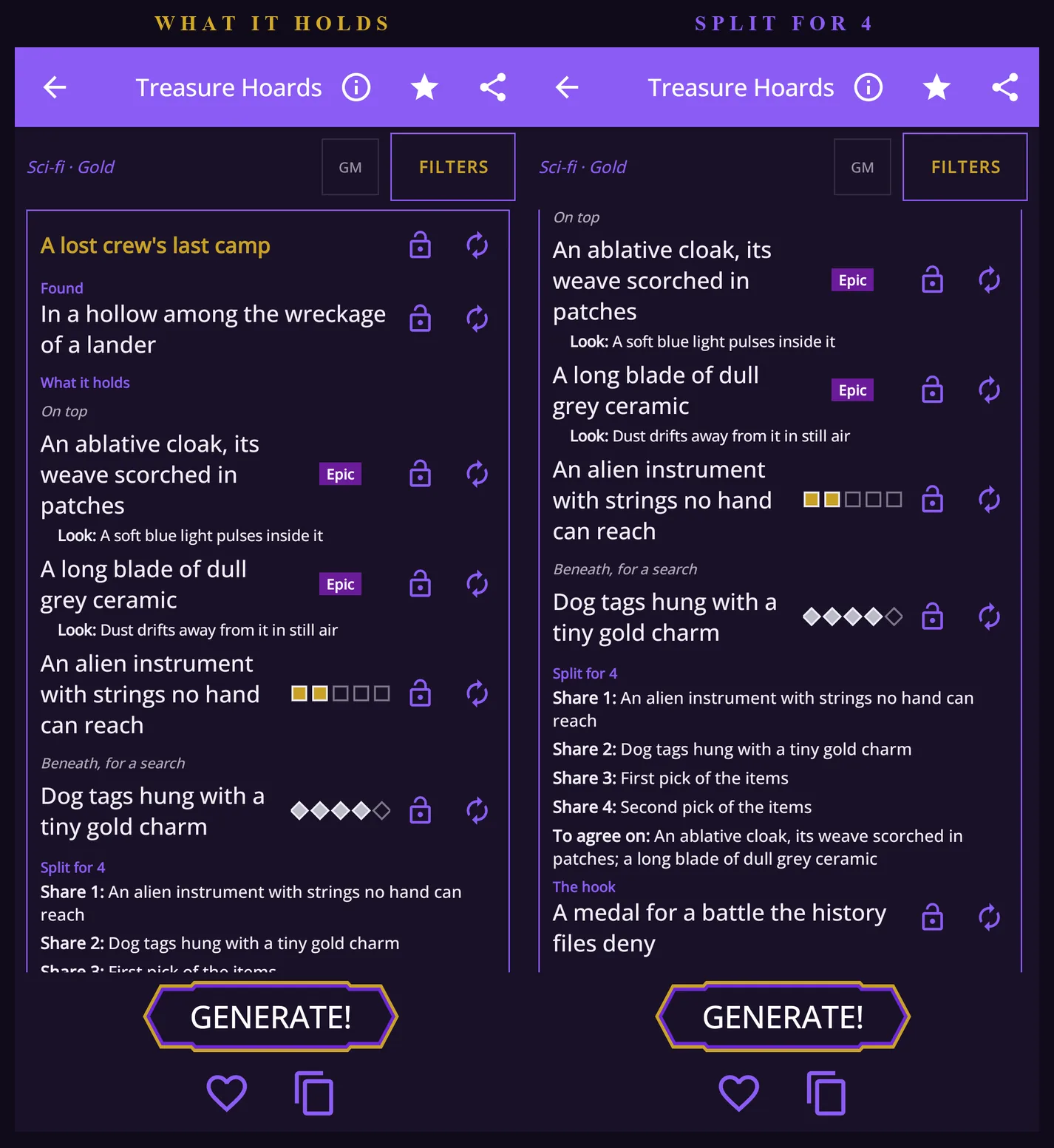
A lost crew's last camp in Treasure Hoards, its two Epic items, an alien instrument and dog tags, beside the same hoard scrolled down to its split for four, two shares with a valuable each and two with first and second pick of the items. A lost crew's last camp, and its split for four.

Each genre has its own owners, places and things. In sci-fi the party found the lost crew's camp "In a hollow among the wreckage of a lander". In 1920s horror they found What the recluse hides from the world, "In a locked cupboard in a cellar", with a tin box of gold sovereigns on top and, Epic, "A deck of tarot cards wrapped in black silk".
Three hoards in Treasure Hoards one after another: a dragon's hoard in fantasy, a lost crew's last camp in sci-fi, and what a recluse hides from the world in 1920s horror. A hoard in each genre: fantasy, sci-fi and 1920s horror.

A hoard you save gets its own list in Favourites. It opens again in Treasure Hoards to be changed, and it can be pinned to the Campaign Board.

Games of Chance

The games from Taverns & Hubs have a tool of their own now, in the Generators Hub with a NEW badge. Press Generate and you get one game: its name, three steps to play it by, tonight's twist, who runs it, what's on the table and a line of table talk. Our first roll was Widow's Hand, a 1920s card game at silver stakes. Five cards go face down in the middle as the widow's hand, and "a hand holding the queen of spades must pay the pot to the widow, which carries over". Tonight, "The house pays double whenever the queen of spades turns up, and nobody will say why", and the game is run by "A man who never blinks", who "has not lost a wager since 1912."

Filters choose the genre and the kind of game: cards, dice, board, wager or contest. A kind has only a handful of games, so rerolls deal each of them before any comes back. Every line has its own lock and die, and a locked line stays only with a game it was written for.

The GM switch works as it does elsewhere. Off, the game is safe to show the table. On, one more line appears: who is cheating. At Widow's Hand, "Somebody has put a dab of whitewash on the card backs that only shows under the green lamp." Copy and Share leave that line out until GM is on.
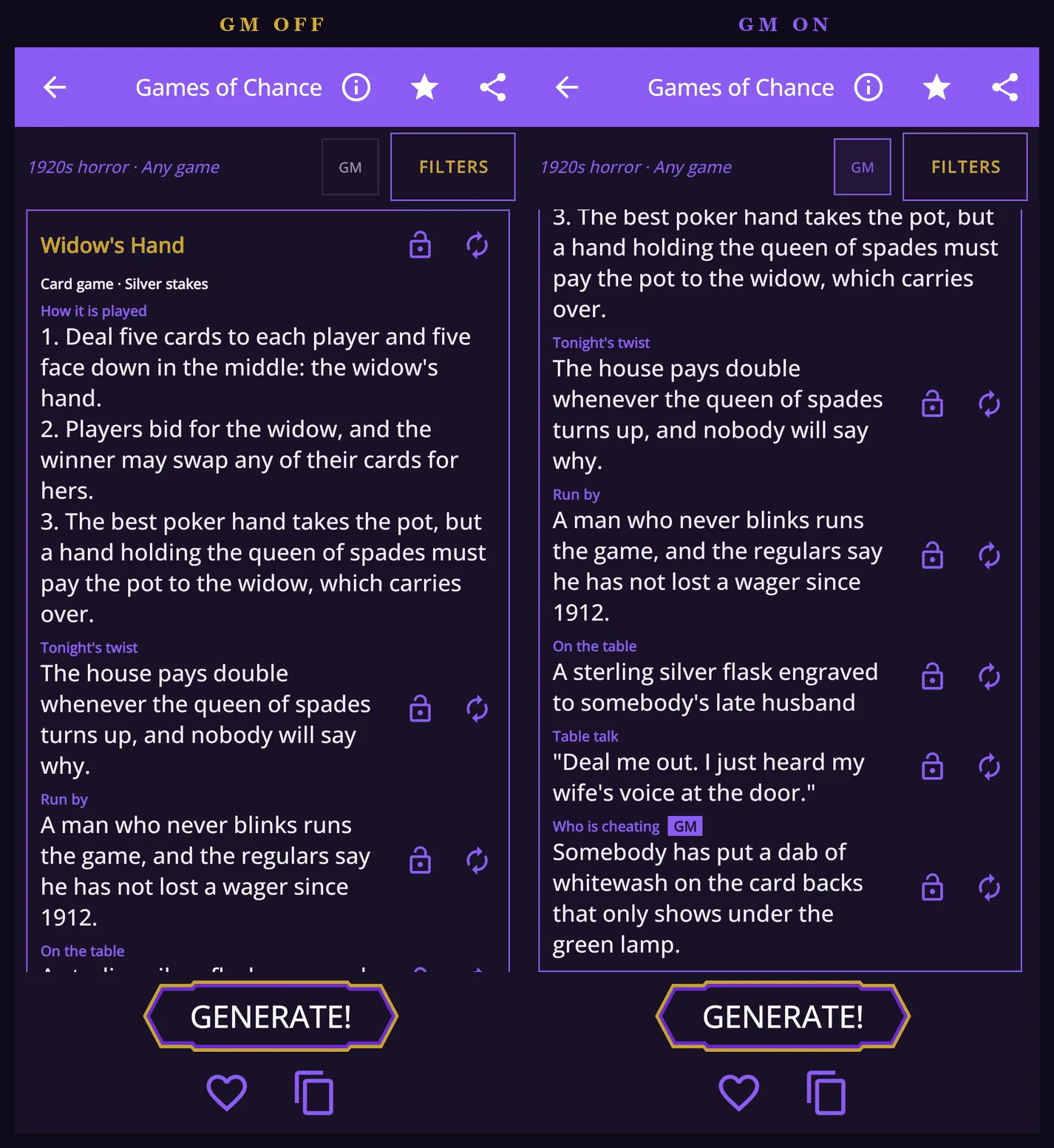
Widow's Hand in Games of Chance with GM off, showing its rules, twist and runner, beside the same game with GM on, scrolled down to the table talk and the line that says who is cheating. Widow's Hand with GM off, and with GM on, the cheat at the bottom.

Bill of Fare

The menus from Taverns & Hubs have their own tool as well. Filters pick the genre, the kind of place, where it stands and how wealthy it is. Each kind leads with its own drinks and dishes, and a house far from the sea serves nothing from it. Our first menu was for a teahouse in a market town, "Inked in a little book chained to each table". Its jugged hare is "made by the cook's apprentice, so set your expectations low", its bread and dripping is "half price to anyone who can guess the cook's secret", and the house special is "The traveller's parcel: bread, cheese, an apple and a sausage, wrapped in a cloth for the road". Under Better avoided, the menu admits that the word "imported" here means from behind the stables.

Prices work as they do in Taverns & Hubs: a tier, bronze, silver or gold, and up to five pips, with a key under the menu saying what a pip buys in that genre. In a fantasy teahouse a bronze pip is "about a copper a pip, the price of a carter's supper."
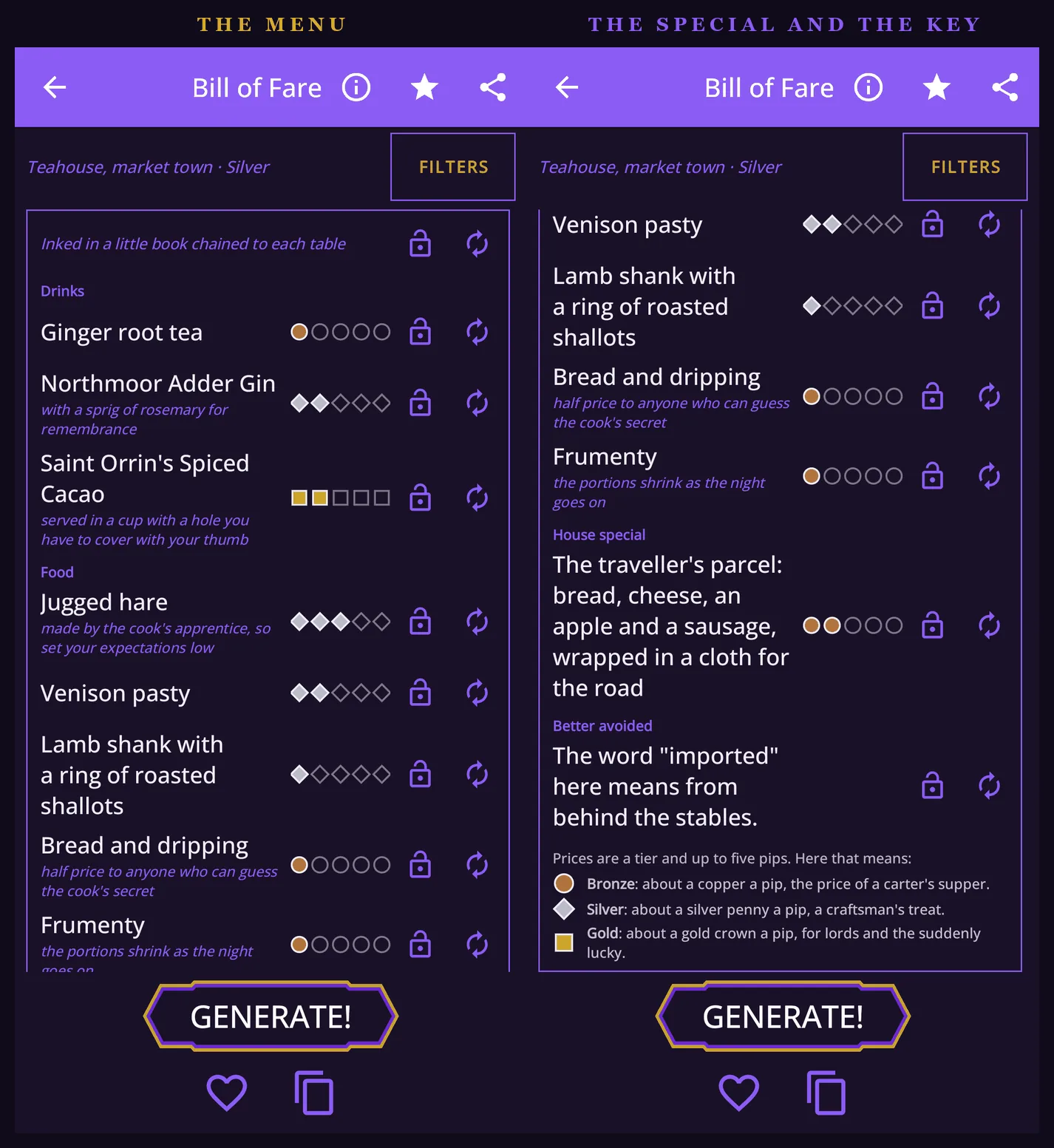
The bill of fare of a teahouse in a market town, its drinks and food each with price pips, beside the end of the same menu with the house special, the line under Better avoided and the key to the prices. A teahouse's bill of fare, and the end of the same menu with its special, its warning and the key to the prices.

Interiors

Interiors is a new tool in the hub's Maps. It draws the inside of a building as a keyed map, the way a published adventure keys its dungeon: every room has a numbered pin, and its card is read off the plan, with the room's size in metres and squares, what stands in it, its exits and its windows. The gate passage of Northcott's Wall, a castle on three floors, is "5 by 6 m, about 3 by 4 squares". With GM on, the hidden rooms and their secret doors appear, numbered last so that the players' pins run without a gap.

Each genre has fifteen buildings: the twelve that Mystery sets its cases in, and three shops. Fantasy has the provisioner, the smithy and the apothecary. Sci-fi has the supply depot, the parts and repair shop and the med clinic, and the 1920s have the pawnshop, the drugstore and the antiquarian bookshop. A shop's counter, shelves, cases and racks are pins of their own, holding what it sells, priced in pips. The Blue Phial, an apothecary, had "Lavender water" on its counter, "dabbed on the temples against a headache". Coldweld Repairs sold a "Smart lock" with "keypad and thumbprint", and Beckwith and Company, Booksellers, had a "Diary", "a stranger's, its last pages torn out".
Four buildings in Interiors one after another: The Blue Phial, an apothecary, with its counter's stock; Northcott's Wall, a castle; Coldweld Repairs, a parts and repair shop; and Beckwith and Company, Booksellers, an antiquarian bookshop. An apothecary, a castle, a parts shop and a bookshop in Interiors.

Interiors shares as the venue tools do: the players' picture, the GM's, and VTT files.

Favourites

Games, menus, buildings and hoards you save get lists of their own in Favourites, and each opens the way its tool draws it. Open in the generator takes it back to its tool to be changed, and a saved building opens as its floor plan on the Campaign Board too.

Reset on Every Filters Sheet

In 4.38.2 every Filters sheet in the app, all 38 of them, has a Reset button next to Apply. Reset puts the sheet back to the way it was on your first visit to that tool, and keeps the genre you are in. Like every other choice on the sheet, it takes effect only when you press Apply, so closing the sheet instead leaves your filters as they were.
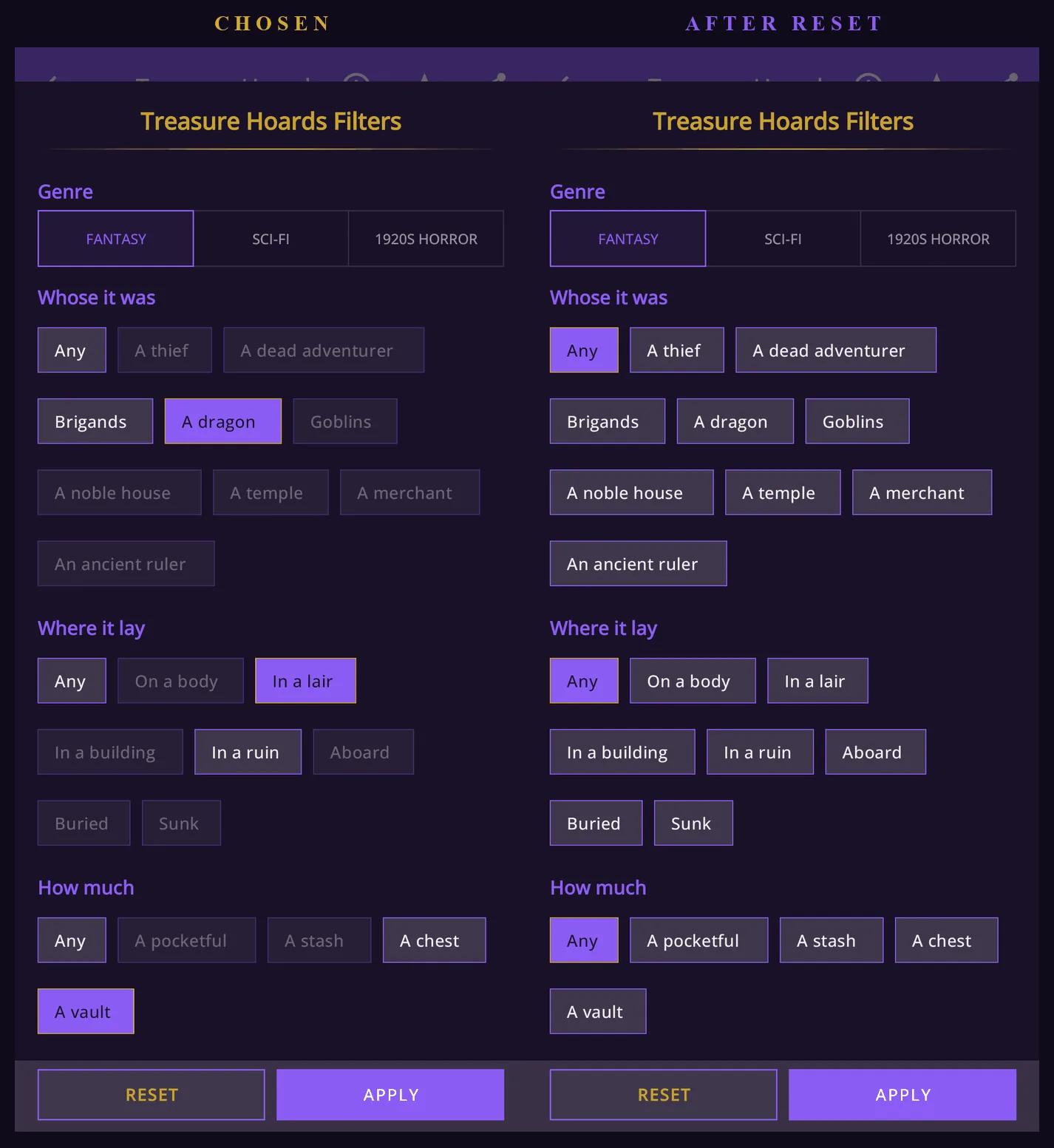
The Treasure Hoards Filters sheet with a dragon, in a lair and a vault chosen and the choices that don't fit them dimmed, beside the same sheet after Reset, back to Any in every row with the genre still fantasy. A sheet with three choices made, and the same sheet after Reset.

Passengers in Trade & Cargo

A run in Trade & Cargo now says who some of its passengers are. One or two of a run's passages carry a line under the fare: "Among them: a wealthy mourner scattering a spouse's ashes one world at a time." When a class of passage has a single passenger, the line is about them: "The passenger: a famous surgeon who booked this cabin twice, under two names." A run you saved before 4.38.2 opens as it was, without these lines.
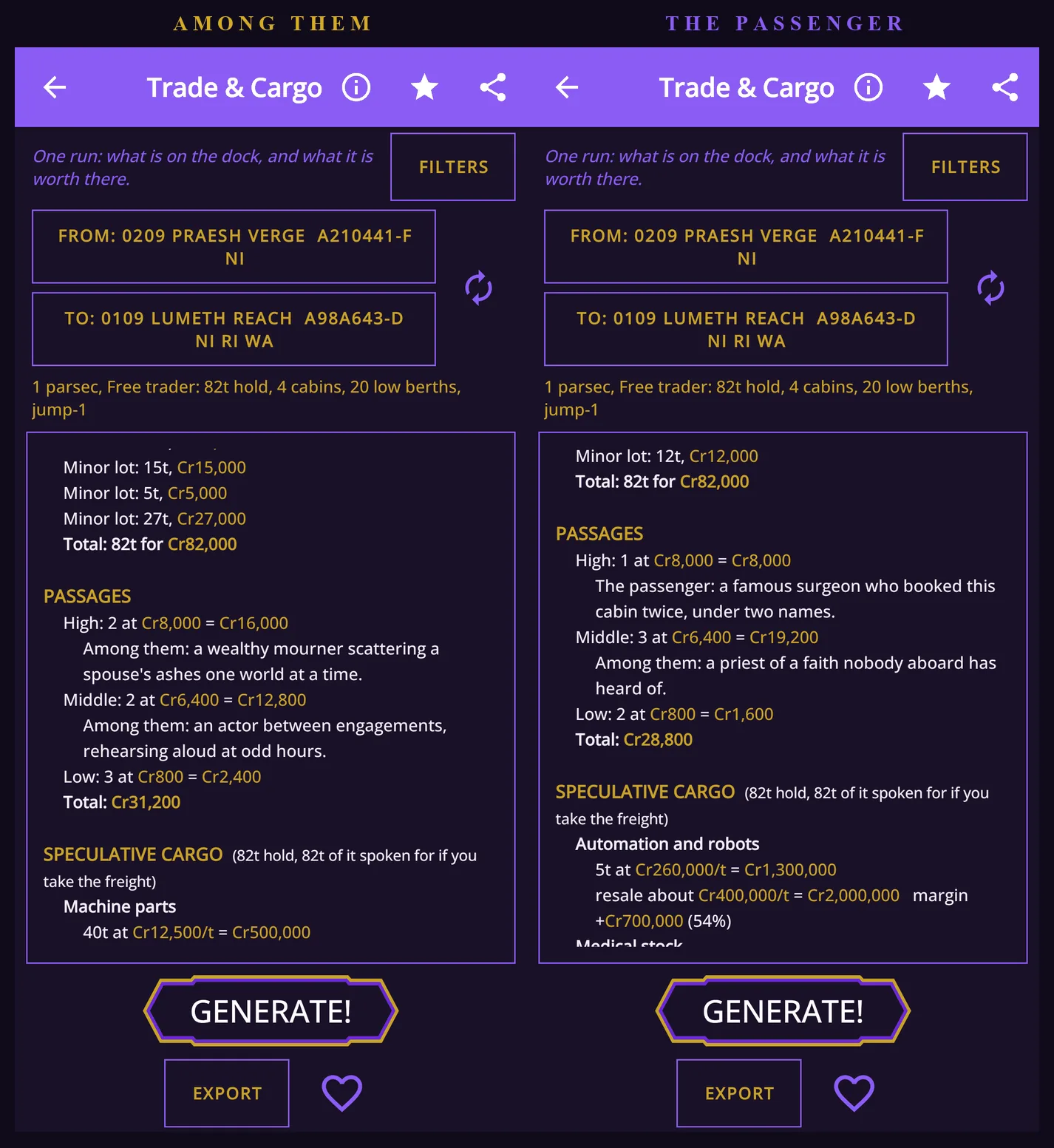
Two runs in Trade & Cargo scrolled to their passages: one with a wealthy mourner in high passage and an actor in middle, the other with a famous surgeon as the only high passenger and a priest in middle. Two runs and their passengers.

The Timeline Maker's Tour

The Timeline Maker's How it works is now a tour in seven steps, like the ones in Mystery, Taverns & Hubs and the Campaign Board, each step showing its own part of the screen. It plays once, on your first visit (if you had already read the old page, it waits to be asked), and the (i) plays it again.

The Hub's Explanations

The (i) beside each tool in the Generators Hub opens an explanation of how it works. In 4.38.2 the longer ones read in short paragraphs instead of one block of text, with not a word changed.

What's New, in the App

Since 4.38.1 the app tells you what changed. The first time you open a new version, the menu shows its notes in a short window, new things first and fixes after, and Got it puts the window away for good. Settings has a What's new button for reading them again. From 4.38.2 the window keeps every version's notes, each under a tab with its version number, and opens on the newest. A fresh install doesn't show the window, since for a new player everything is new.
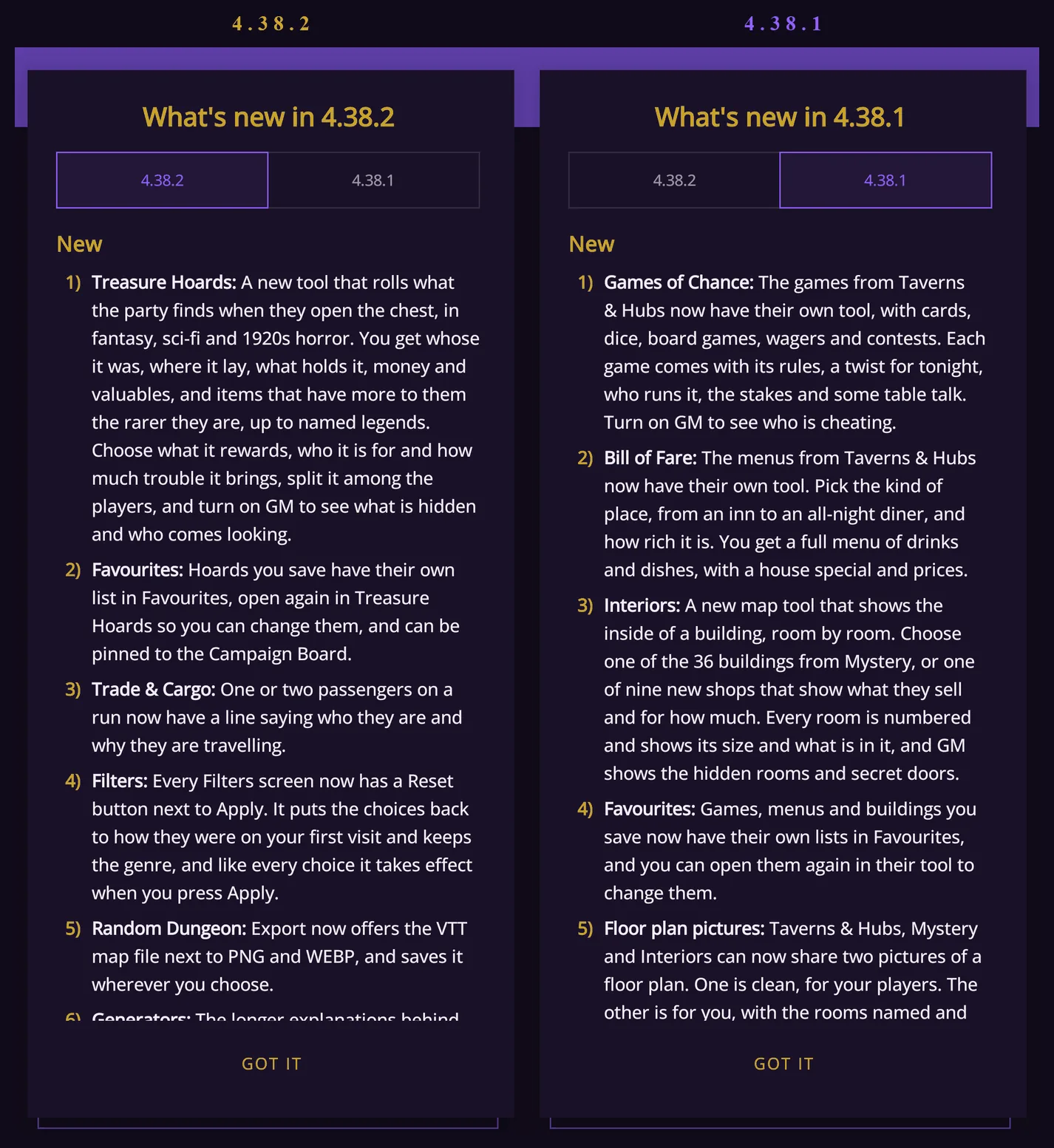
The What's new window open on the 4.38.2 tab, its New list starting with Treasure Hoards, beside the same window on the 4.38.1 tab, its New list starting with Games of Chance. The notes for 4.38.2, and a tap away, the notes for 4.38.1.

The Full Notes

Here are both lists, word for word as the app shows them.

4.38.2

New

1) Treasure Hoards: A new tool that rolls what the party finds when they open the chest, in fantasy, sci-fi and 1920s horror. You get whose it was, where it lay, what holds it, money and valuables, and items that have more to them the rarer they are, up to named legends. Choose what it rewards, who it is for and how much trouble it brings, split it among the players, and turn on GM to see what is hidden and who comes looking.

2) Favourites: Hoards you save have their own list in Favourites, open again in Treasure Hoards so you can change them, and can be pinned to the Campaign Board.

3) Trade & Cargo: One or two passengers on a run now have a line saying who they are and why they are travelling.

4) Filters: Every Filters screen now has a Reset button next to Apply. It puts the choices back to how they were on your first visit and keeps the genre, and like every choice it takes effect when you press Apply.

5) Random Dungeon: Export now offers the VTT map file next to PNG and WEBP, and saves it wherever you choose.

6) Generators: The longer explanations behind the (i) buttons are now split into short paragraphs.

7) What's new: The notes of earlier updates stay here, each under a tab with its version number.

Fixed

1) Bestiary: A creature with a title like "the Last" now stays one creature when you reroll its stats.

4.38.1

New

1) Games of Chance: The games from Taverns & Hubs now have their own tool, with cards, dice, board games, wagers and contests. Each game comes with its rules, a twist for tonight, who runs it, the stakes and some table talk. Turn on GM to see who is cheating.

2) Bill of Fare: The menus from Taverns & Hubs now have their own tool. Pick the kind of place, from an inn to an all-night diner, and how rich it is. You get a full menu of drinks and dishes, with a house special and prices.

3) Interiors: A new map tool that shows the inside of a building, room by room. Choose one of the 36 buildings from Mystery, or one of nine new shops that show what they sell and for how much. Every room is numbered and shows its size and what is in it, and GM shows the hidden rooms and secret doors.

4) Favourites: Games, menus and buildings you save now have their own lists in Favourites, and you can open them again in their tool to change them.

5) Floor plan pictures: Taverns & Hubs, Mystery and Interiors can now share two pictures of a floor plan. One is clean, for your players. The other is for you, with the rooms named and the hidden rooms and secret doors marked.

6) VTT maps: Taverns & Hubs, Mystery, Interiors and the Random Dungeon can now share a map file with its walls and doors, for virtual tabletops like Foundry, Roll20 and Fantasy Grounds.

7) PNG or WEBP: The Save PNG button is now called Export. Any picture you save or share can be a PNG, which keeps every line sharp, or a WEBP, which makes a smaller file. The app asks which you want, or you can set it once in Settings.

8) Timeline Maker: Its help is now a short tour that shows you each part of the screen, step by step.

Fixed

1) Taverns & Hubs games: A locked game now stays when you press Generate, and a new game always fits the lines you locked. Rerolling a twist gives one made for that kind of game, and saved venues now show each game's table talk.

2) Taverns & Hubs menus: Locked menu lines now stay in place when you press Generate. A menu no longer lists the same dish twice, the house special is never a dish that is already on it, and the dish to avoid is always one it serves.

3) Large text: At the biggest text size, the GM tag next to a long line is no longer squeezed or cut off in Taverns & Hubs and Mystery.

4) TalkBack: The screen reader now names Mystery's map correctly, as the building where the case happens.

5) Map Maker: The favourite button is now a heart, like on the other map screens.

Your Saves Are Safe

Every favourite, preset, note, campaign, map and setting you already have opens and looks the way it did before either update. The new tools save new kinds of favourite of their own, and VTT files and pictures are exports, so nothing you saved before is read any differently. A Trade & Cargo run saved before 4.38.2 opens without the new passenger lines, as it always did. Wherever a tool now writes differently, the difference shows only in what you make next.

Version 4.38.2 is free on Google Play now. In the cellar of Under the Bearded Knight, the hidden room is still behind its wall, waiting for somebody to delete it.


Download Fantasy World Generator

Walls and doors for the tabletop, four new tools, and maps at a fraction of the size.

From the Phone to the Tabletop: VTT Maps and Everything Else in 4.38.1 and 4.38.2

Versions 4.38.1 and 4.38.2 are out, and this time the maps leave the phone.

After 4.38 came out, Fantasy Grounds players asked us for three things. The first was a map that carries its own walls, so nobody has to trace them again on a virtual tabletop. The second was one picture for the players and another for the GM, and the third was WEBP, so a floor plan doesn't cost megabytes to send. 4.38.1 does all three. Around them sit three new tools (Games of Chance, Bill of Fare and Interiors), a tour for the Timeline Maker, a window that tells you what changed, and a handful of fixes. 4.38.2 adds a fourth tool, Treasure Hoards, for what the party finds when they open the chest, gives the Random Dungeon's Export button the same VTT file, and puts a Reset button on every Filters sheet. This post goes through all of it, starting at the tabletop.

4.38.1 and 4.38.2 at a Glance

New in 4.38.2

  • Treasure Hoards: what the party finds in the chest, in fantasy, sci-fi and 1920s horror, from coin and valuables to named legends, with a GM switch for what the players don't see.
  • The Random Dungeon's Export: VTT beside PNG and WEBP, saved wherever you choose.
  • Reset: every Filters sheet has a Reset button next to Apply.
  • Passengers: in Trade & Cargo, one or two passengers on a run say who they are and why they are travelling.
  • And: the hub's longer explanations in paragraphs, What's new with a tab for every version, and a Bestiary fix.

New in 4.38.1

  • VTT maps: Taverns & Hubs, Mystery, Interiors and the Random Dungeon share a floor as a Universal VTT file, with its walls, doors and grid.
  • Two pictures: one floor or every floor, as the players' plan and as the GM's blueprint with the rooms named and the secrets marked.
  • WEBP at 75%: every picture the app exports can be a WEBP, a fraction of a PNG's size. Save PNG is now called Export.
  • Games of Chance: the games from Taverns & Hubs in a tool of their own, with a GM switch for the cheat.
  • Bill of Fare: the menus from Taverns & Hubs in a tool of their own, priced in pips.
  • Interiors: the inside of a building as a keyed map, from Mystery's 36 buildings to nine new shops and their stock.
  • Favourites: games, menus and buildings get lists of their own and go back to their tool to be changed.
  • What's new: the app lists what changed, once, the first time you open an update.
  • Fixes: locks and menus in Taverns & Hubs, the GM tag at large text, TalkBack in Mystery, and a heart for Map Maker.

Your saves: everything you saved opens exactly as it did, after either update.

From the Phone to the Tabletop

Share in Taverns & Hubs, Mystery and Interiors opens a popup called Export the floor plan, and the first thing it asks is the format: PNG, WEBP or VTT. VTT is the new one. It writes a Universal VTT file, one for each floor, holding the floor's picture, its grid, every wall as a wall that blocks sight and every door as a door that opens and shuts. Fantasy Grounds Unity imports the file directly, and Foundry and Roll20 read it through an importer add-on, so you place the map instead of drawing it again.

For this post we rolled Under the Bearded Knight, a tavern in a port, on three floors. The cellar floor "is flagged with old tombstones, the names worn smooth except one, which is the owner's", and with GM on it has a hidden room (22) and a tunnel (23). Its VTT file is 15 by 12 squares at 128 pixels a square, with 18 walls and one door. A square is 1.5 metres, which plays as the usual 5 feet.

The cellar of Under the Bearded Knight in Taverns & Hubs with GM on, its hidden room and tunnel marked, beside the Export the floor plan popup set to VTT. The cellar with GM on, and its Share set to VTT.

The popup says what happens to the secrets: "Hidden rooms are drawn but walled off: when the party finds a secret door, delete its wall on the tabletop." The picture inside the file is the players' plan, with no pins and no names, and the hidden room drawn behind a wall that comes out when the party earns it. Windows block sight as the wall around them does, and the lighting is left to the tabletop.

In Fantasy Grounds

We took the files into Fantasy Grounds Unity through the Images window's Import button. A sleeper train from Mystery came in with all 145 of its walls and 37 doors where the plan draws them, and a tavern from Taverns & Hubs with its 26 walls and 7 doors. With line of sight on, a token in the tavern's hall sees the hall and nothing past its walls. Open a door and its sight runs through into the room behind.

A sleeper train from Mystery in a Fantasy Grounds Unity campaign, beside a close view of its carriages with the walls drawn in red and the doors in blue. A sleeper train from Mystery in Fantasy Grounds Unity, and a closer look at its walls and doors.

A tavern hall in Fantasy Grounds with line of sight on: first only the hall around the token is visible, then a door is opened and the room behind it comes into view. A tavern hall with line of sight on, and the same hall with one door opened.

The Random Dungeon makes a VTT file too, with the dungeon's walls and doors and the room numbers left off the picture. Its Share asks every time, PNG, WEBP or VTT, and sends the room key alongside as text. In 4.38.2 its Export button offers the same three. Pick VTT and the phone's own Save dialog opens, so the file goes wherever you choose instead of into a message. It is the same file Share sends. A dungeon we saved this way came to 41 by 31 squares, with 342 walls and 49 doors.

The Random Dungeon's Export as popup offering PNG, WEBP and VTT, set to VTT, beside the phone's Save dialog open on an empty Documents folder with the file named Dungeon.dd2vtt. Export set to VTT, and the Save dialog it opens.

A Picture for the Players, One for the GM

Not every table plays on a virtual tabletop. Set the same popup to PNG or WEBP and it sends pictures instead: the players' picture, the GM's, or both, of this floor or every floor. The players' picture is the plan alone, with nothing on it the players shouldn't see. The GM's is the blueprint, with every room named, the hidden rooms, secret doors and tunnels drawn in, and a numbered pin at every spot.

The two pictures are the same size, so they line up exactly, and the text goes with them. The GM's text is numbered by pin, so "20. The cellar", "21. The vault" and "22. The hidden room (GM)" match the map. Tick Add the text as a .txt file and it travels as a file as well, for the apps that keep pictures and drop the message.

The cellar of Under the Bearded Knight as the players' picture, a plain floor plan, beside the GM's picture, a blueprint naming the vault and the cellar and showing the hidden room 22 and the tunnel 23. The same cellar twice: the players' picture, and the GM's with the vault, the hidden room and the tunnel.

Smaller Files: WEBP at 75%

Every picture the app exports can now be a PNG or a WEBP. The Export button on the map tools (it said Save PNG until now) and Share on every map screen ask which one you want. "PNG keeps every line sharp. WEBP makes a smaller file." Tick Remember my choice and they stop asking. Settings has the same choice under Image format, where Ask each time brings the question back. The Random Dungeon, whose Export and Share also offer VTT, asks every time.

The Export as popup on the Fantasy Map offering PNG or WEBP with Remember my choice, beside the Image format setting in Settings open on Ask each time, PNG and WEBP. Export as on the Fantasy Map, and the Image format setting.

The difference in size is large. The cellar's players' picture came to 340 KB as a PNG and 33 KB as a WEBP, and the GM's to 311 KB and 73 KB. A whole Fantasy Map, 2928 by 4096 pixels, was 2.3 MB as a PNG and 0.4 MB as a WEBP, and side by side at full size the two are hard to tell apart.

The same corner of the same Fantasy Map at full size, with its mountains, forest and rivers, saved as a 2.3 MB PNG and as a 0.4 MB WEBP. The same corner of one Fantasy Map at full size: the PNG on the left, the WEBP on the right.

Treasure Hoards

The newest tool, in 4.38.2, is Treasure Hoards, in the Generators Hub with a NEW badge. Press Generate and you get what the party finds when they open the chest: whose it was, where it lay and what holds it, what lies on top, what a search turns up beneath it, and what only the GM knows is hidden. Money and valuables are priced in pips, from bronze to diamond. Items carry a rarity, from common to unique, and the rarer an item is, the more there is to it, up to legends with names of their own.

For this post we asked for a dragon's vault in its lair and rerolled until a legend turned up. What the dragon sleeps on was "Heaped across a cavern floor among bones": a bale of fine furs, lynx and marten, "A star sapphire as big as a quail's egg", a dozen gold ingots stamped with a crown, a pile of heavy coins from a lost empire and "A glaive with a blade like a scythe", Legendary. Beneath it, for a search, lay a ruby necklace "once worn at a royal wedding" and "The eye of an idol, a single huge sapphire".

The GM switch decides who the hoard is for. With GM off it is the players' hoard: the glaive shows only what they can see of it, "It is perfectly silent, even when struck". With GM on it has its name, Quietus, Dread of the Deep Roads, and the rest of its story. Its power is that "Stone gives way to it as easily as cloth". It was "Lost under a lake for a lifetime, then found by a child", and every use has a price: "Each use takes a memory its bearer loved". GM also shows the catch, "The dragon will count it again tonight", and who comes looking, "A rival thief with a forged claim". Copy and Share leave the GM's lines out until GM is on.

What the dragon sleeps on in Treasure Hoards with GM off, its valuables with their pips and a Legendary glaive showing only its look, beside the same hoard with GM on, the glaive named Quietus, Dread of the Deep Roads with its power, history and price, and the catch and who comes looking below. A dragon's hoard with GM off, and with GM on.

Filters choose the genre and what the hoard is. You can pick whose it was (in fantasy a thief, a dead adventurer, brigands, a dragon, goblins, a noble house, a temple, a merchant or an ancient ruler) and where it lay: on a body, in a lair, in a building, in a ruin, aboard, buried or sunk. You can also pick how much (a pocketful, a stash, a chest or a vault), what it rewards (a skirmish, a dungeon level, a boss or a campaign's end), who the party is, and how much trouble it brings: clean, strings attached, or cursed and hunted. Choices that don't fit the ones you picked go dim. Every line has its own lock and die, and the whole thing rerolls around what you lock.

Ask for a split, from 2 to 6 players, and the hoard is shared out under its contents. We split a sci-fi hoard, A lost crew's last camp, four ways. Two players got a valuable each, "An alien instrument with strings no hand can reach" and "Dog tags hung with a tiny gold charm". The two items, both Epic, an ablative cloak and a long ceramic blade, were left "To agree on". The two players with no valuable got "First pick of the items" and "Second pick of the items". When there are no items left to pick, an empty share is owed a share of the next find.

A lost crew's last camp in Treasure Hoards, its two Epic items, an alien instrument and dog tags, beside the same hoard scrolled down to its split for four, two shares with a valuable each and two with first and second pick of the items. A lost crew's last camp, and its split for four.

Each genre has its own owners, places and things. In sci-fi the party found the lost crew's camp "In a hollow among the wreckage of a lander". In 1920s horror they found What the recluse hides from the world, "In a locked cupboard in a cellar", with a tin box of gold sovereigns on top and, Epic, "A deck of tarot cards wrapped in black silk".

Three hoards in Treasure Hoards one after another: a dragon's hoard in fantasy, a lost crew's last camp in sci-fi, and what a recluse hides from the world in 1920s horror. A hoard in each genre: fantasy, sci-fi and 1920s horror.

A hoard you save gets its own list in Favourites. It opens again in Treasure Hoards to be changed, and it can be pinned to the Campaign Board.

Games of Chance

The games from Taverns & Hubs have a tool of their own now, in the Generators Hub with a NEW badge. Press Generate and you get one game: its name, three steps to play it by, tonight's twist, who runs it, what's on the table and a line of table talk. Our first roll was Widow's Hand, a 1920s card game at silver stakes. Five cards go face down in the middle as the widow's hand, and "a hand holding the queen of spades must pay the pot to the widow, which carries over". Tonight, "The house pays double whenever the queen of spades turns up, and nobody will say why", and the game is run by "A man who never blinks", who "has not lost a wager since 1912."

Filters choose the genre and the kind of game: cards, dice, board, wager or contest. A kind has only a handful of games, so rerolls deal each of them before any comes back. Every line has its own lock and die, and a locked line stays only with a game it was written for.

The GM switch works as it does elsewhere. Off, the game is safe to show the table. On, one more line appears: who is cheating. At Widow's Hand, "Somebody has put a dab of whitewash on the card backs that only shows under the green lamp." Copy and Share leave that line out until GM is on.

Widow's Hand in Games of Chance with GM off, showing its rules, twist and runner, beside the same game with GM on, scrolled down to the table talk and the line that says who is cheating. Widow's Hand with GM off, and with GM on, the cheat at the bottom.

Bill of Fare

The menus from Taverns & Hubs have their own tool as well. Filters pick the genre, the kind of place, where it stands and how wealthy it is. Each kind leads with its own drinks and dishes, and a house far from the sea serves nothing from it. Our first menu was for a teahouse in a market town, "Inked in a little book chained to each table". Its jugged hare is "made by the cook's apprentice, so set your expectations low", its bread and dripping is "half price to anyone who can guess the cook's secret", and the house special is "The traveller's parcel: bread, cheese, an apple and a sausage, wrapped in a cloth for the road". Under Better avoided, the menu admits that the word "imported" here means from behind the stables.

Prices work as they do in Taverns & Hubs: a tier, bronze, silver or gold, and up to five pips, with a key under the menu saying what a pip buys in that genre. In a fantasy teahouse a bronze pip is "about a copper a pip, the price of a carter's supper."

The bill of fare of a teahouse in a market town, its drinks and food each with price pips, beside the end of the same menu with the house special, the line under Better avoided and the key to the prices. A teahouse's bill of fare, and the end of the same menu with its special, its warning and the key to the prices.

Interiors

Interiors is a new tool in the hub's Maps. It draws the inside of a building as a keyed map, the way a published adventure keys its dungeon: every room has a numbered pin, and its card is read off the plan, with the room's size in metres and squares, what stands in it, its exits and its windows. The gate passage of Northcott's Wall, a castle on three floors, is "5 by 6 m, about 3 by 4 squares". With GM on, the hidden rooms and their secret doors appear, numbered last so that the players' pins run without a gap.

Each genre has fifteen buildings: the twelve that Mystery sets its cases in, and three shops. Fantasy has the provisioner, the smithy and the apothecary. Sci-fi has the supply depot, the parts and repair shop and the med clinic, and the 1920s have the pawnshop, the drugstore and the antiquarian bookshop. A shop's counter, shelves, cases and racks are pins of their own, holding what it sells, priced in pips. The Blue Phial, an apothecary, had "Lavender water" on its counter, "dabbed on the temples against a headache". Coldweld Repairs sold a "Smart lock" with "keypad and thumbprint", and Beckwith and Company, Booksellers, had a "Diary", "a stranger's, its last pages torn out".

Four buildings in Interiors one after another: The Blue Phial, an apothecary, with its counter's stock; Northcott's Wall, a castle; Coldweld Repairs, a parts and repair shop; and Beckwith and Company, Booksellers, an antiquarian bookshop. An apothecary, a castle, a parts shop and a bookshop in Interiors.

Interiors shares as the venue tools do: the players' picture, the GM's, and VTT files.

Favourites

Games, menus, buildings and hoards you save get lists of their own in Favourites, and each opens the way its tool draws it. Open in the generator takes it back to its tool to be changed, and a saved building opens as its floor plan on the Campaign Board too.

Reset on Every Filters Sheet

In 4.38.2 every Filters sheet in the app, all 38 of them, has a Reset button next to Apply. Reset puts the sheet back to the way it was on your first visit to that tool, and keeps the genre you are in. Like every other choice on the sheet, it takes effect only when you press Apply, so closing the sheet instead leaves your filters as they were.

The Treasure Hoards Filters sheet with a dragon, in a lair and a vault chosen and the choices that don't fit them dimmed, beside the same sheet after Reset, back to Any in every row with the genre still fantasy. A sheet with three choices made, and the same sheet after Reset.

Passengers in Trade & Cargo

A run in Trade & Cargo now says who some of its passengers are. One or two of a run's passages carry a line under the fare: "Among them: a wealthy mourner scattering a spouse's ashes one world at a time." When a class of passage has a single passenger, the line is about them: "The passenger: a famous surgeon who booked this cabin twice, under two names." A run you saved before 4.38.2 opens as it was, without these lines.

Two runs in Trade & Cargo scrolled to their passages: one with a wealthy mourner in high passage and an actor in middle, the other with a famous surgeon as the only high passenger and a priest in middle. Two runs and their passengers.

The Timeline Maker's Tour

The Timeline Maker's How it works is now a tour in seven steps, like the ones in Mystery, Taverns & Hubs and the Campaign Board, each step showing its own part of the screen. It plays once, on your first visit (if you had already read the old page, it waits to be asked), and the (i) plays it again.

The Hub's Explanations

The (i) beside each tool in the Generators Hub opens an explanation of how it works. In 4.38.2 the longer ones read in short paragraphs instead of one block of text, with not a word changed.

What's New, in the App

Since 4.38.1 the app tells you what changed. The first time you open a new version, the menu shows its notes in a short window, new things first and fixes after, and Got it puts the window away for good. Settings has a What's new button for reading them again. From 4.38.2 the window keeps every version's notes, each under a tab with its version number, and opens on the newest. A fresh install doesn't show the window, since for a new player everything is new.

The What's new window open on the 4.38.2 tab, its New list starting with Treasure Hoards, beside the same window on the 4.38.1 tab, its New list starting with Games of Chance. The notes for 4.38.2, and a tap away, the notes for 4.38.1.

The Full Notes

Here are both lists, word for word as the app shows them.

4.38.2

New

1) Treasure Hoards: A new tool that rolls what the party finds when they open the chest, in fantasy, sci-fi and 1920s horror. You get whose it was, where it lay, what holds it, money and valuables, and items that have more to them the rarer they are, up to named legends. Choose what it rewards, who it is for and how much trouble it brings, split it among the players, and turn on GM to see what is hidden and who comes looking.

2) Favourites: Hoards you save have their own list in Favourites, open again in Treasure Hoards so you can change them, and can be pinned to the Campaign Board.

3) Trade & Cargo: One or two passengers on a run now have a line saying who they are and why they are travelling.

4) Filters: Every Filters screen now has a Reset button next to Apply. It puts the choices back to how they were on your first visit and keeps the genre, and like every choice it takes effect when you press Apply.

5) Random Dungeon: Export now offers the VTT map file next to PNG and WEBP, and saves it wherever you choose.

6) Generators: The longer explanations behind the (i) buttons are now split into short paragraphs.

7) What's new: The notes of earlier updates stay here, each under a tab with its version number.

Fixed

1) Bestiary: A creature with a title like "the Last" now stays one creature when you reroll its stats.

4.38.1

New

1) Games of Chance: The games from Taverns & Hubs now have their own tool, with cards, dice, board games, wagers and contests. Each game comes with its rules, a twist for tonight, who runs it, the stakes and some table talk. Turn on GM to see who is cheating.

2) Bill of Fare: The menus from Taverns & Hubs now have their own tool. Pick the kind of place, from an inn to an all-night diner, and how rich it is. You get a full menu of drinks and dishes, with a house special and prices.

3) Interiors: A new map tool that shows the inside of a building, room by room. Choose one of the 36 buildings from Mystery, or one of nine new shops that show what they sell and for how much. Every room is numbered and shows its size and what is in it, and GM shows the hidden rooms and secret doors.

4) Favourites: Games, menus and buildings you save now have their own lists in Favourites, and you can open them again in their tool to change them.

5) Floor plan pictures: Taverns & Hubs, Mystery and Interiors can now share two pictures of a floor plan. One is clean, for your players. The other is for you, with the rooms named and the hidden rooms and secret doors marked.

6) VTT maps: Taverns & Hubs, Mystery, Interiors and the Random Dungeon can now share a map file with its walls and doors, for virtual tabletops like Foundry, Roll20 and Fantasy Grounds.

7) PNG or WEBP: The Save PNG button is now called Export. Any picture you save or share can be a PNG, which keeps every line sharp, or a WEBP, which makes a smaller file. The app asks which you want, or you can set it once in Settings.

8) Timeline Maker: Its help is now a short tour that shows you each part of the screen, step by step.

Fixed

1) Taverns & Hubs games: A locked game now stays when you press Generate, and a new game always fits the lines you locked. Rerolling a twist gives one made for that kind of game, and saved venues now show each game's table talk.

2) Taverns & Hubs menus: Locked menu lines now stay in place when you press Generate. A menu no longer lists the same dish twice, the house special is never a dish that is already on it, and the dish to avoid is always one it serves.

3) Large text: At the biggest text size, the GM tag next to a long line is no longer squeezed or cut off in Taverns & Hubs and Mystery.

4) TalkBack: The screen reader now names Mystery's map correctly, as the building where the case happens.

5) Map Maker: The favourite button is now a heart, like on the other map screens.

Your Saves Are Safe

Every favourite, preset, note, campaign, map and setting you already have opens and looks the way it did before either update. The new tools save new kinds of favourite of their own, and VTT files and pictures are exports, so nothing you saved before is read any differently. A Trade & Cargo run saved before 4.38.2 opens without the new passenger lines, as it always did. Wherever a tool now writes differently, the difference shows only in what you make next.

Version 4.38.2 is free on Google Play now. In the cellar of Under the Bearded Knight, the hidden room is still behind its wall, waiting for somebody to delete it.


Download Fantasy World Generator

Walls and doors for the tabletop, four new tools, and maps at a fraction of the size.

Want to be told when the next story drops?

Θέλετε να μάθετε πρώτοι για την επόμενή μας ιστορία;

Quiet updates, no spam. Only when something worth sharing is ready.

Διακριτικά νέα, χωρίς ενοχλήσεις. Μόνο όταν έχουμε κάτι αξιόλογο να πούμε.

SubscribeΕγγραφή