November 12, 2026 · CHARIS BACHTSEVANI

#devlog #dungeon #tools #announcement

A Dungeon That Grows as You Play, and Everything Else in 4.39.2

Version 4.39.2 is out, and its biggest change is a new tool in Maps, the Endless Dungeon. It is a dungeon that grows as your party plays it: each floor is built the first time the party goes down to it, every room has a card, and you run it at the table with your players' map under fog, a turn clock, light and a log you can undo. Quick Access also has dice now, thrown over whatever screen you are on. This post lists everything first, then walks through the Endless Dungeon step by step, in the order you meet each part of it at the table.

4.39.2 at a Glance

  • Endless Dungeon: a new tool in Maps, in fantasy, sci-fi and 1920s horror. Each floor is built the first time the party reaches it, filled with the app's own creatures, treasure and traps, and stays as it was played.
  • Room cards: every room has a card, with what the party sees first and then, for you alone, who is there, its traps and its treasure, linked to the Bestiary and Treasure Hoards.
  • At the table: the party's token walks the shortest way and opens doors, the fog lifts on the players' map as they go, and the table keeps turns, rests, days, light and wandering checks, with a log and Show the players.
  • Changing a floor: floor and rock, walls and doors, liquids, surfaces, hazards, objects and stairs, each edit checked against the floor's rules and taken back with Undo.
  • Looks: fourteen looks drawn from the floor itself, four palettes, five steps of brightness, a raised view, and lighting, night, grime, mould and sketchy lines.
  • Your delves: every delve you begin is kept. Settings and presets set how its floors are built, favourites keep a delve as it stands, and Share exports pictures, VTT map files and the room cards as text.
  • Dice: Quick Access has dice from d4 to d100, up to twenty in a throw, thrown over the screen you are on.
  • Fixes: a long name on a classic Map Maker map stays inside its frame, and an Occult Seal no longer reads its own name as an ordinary word.
  • NEW badges: Taverns & Hubs, Mystery, Bill of Fare, Games of Chance and Interiors are no longer marked new.

Your saves: everything you saved opens exactly as it did.

The Endless Dungeon, Step by Step

The Endless Dungeon is in the Generators hub, under Maps. The first time you open it, a tour of eighteen steps shows each part of the screen in the order you meet it, and the (i) at the top plays it again later. The steps below follow the same order, on a fantasy delve begun from the defaults.

Beginning a delve

Delves, at the bottom of the screen, keeps every delve you begin. New delve, at its top, begins another. Pick the genre (fantasy, sci-fi or 1920s horror), the floor size (small, medium, large or huge), the danger, which is "How fast the creatures and traps grow harder as the party goes down.", and how deep it goes: endless, or a floor where the delve ends. Every other setting comes "From the delve in play, from the defaults, or from a preset saved in the settings." Begin builds the entrance at once, and each floor below is built the first time the party goes down to it.
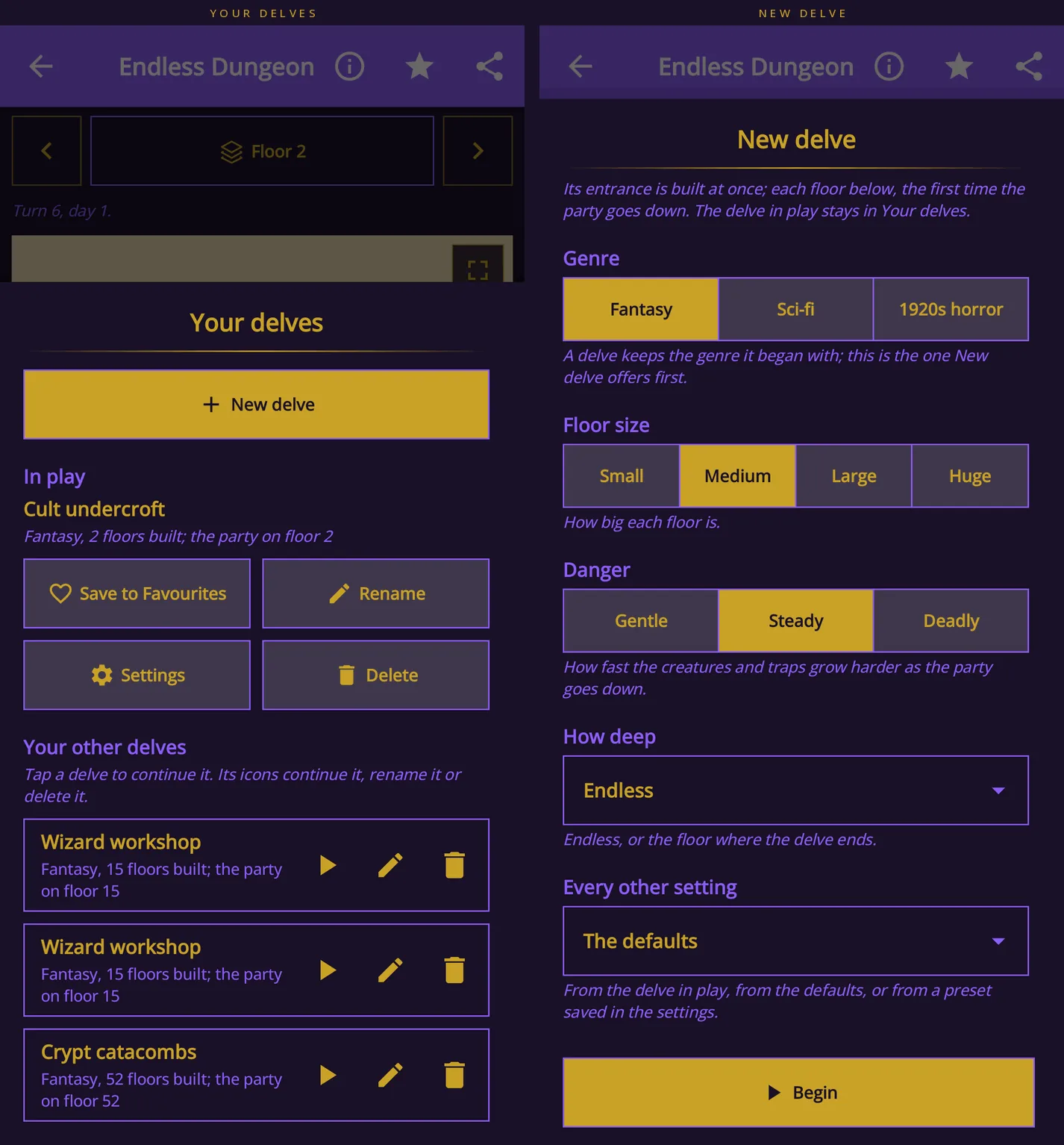
Your delves, with the delve in play and three others, beside New delve with Fantasy, Medium and Steady chosen, How deep set to Endless and every other setting from the defaults. Your delves, and New delve.

The screen

Here is the new delve's entrance, drawn in the Ligne claire look. At the top are the floors: the arrows step through the floors built so far, and the floor's name opens the list of them all. Under them, the clock keeps the time, a turn being ten minutes. You drag the map to look round, and pinch or tap twice to zoom. The buttons down its right side fit the whole floor on screen again, change the map's look, switch to the players' map, and undo or redo; hold one to read its name.

On the GM's map, the purple ring is the party's token, a red dot after a room's number is a group of creatures, a red cross is a trap and a gold diamond is a hoard. Under the map are What a tap does, the table, Ascend, Descend and Your delves.
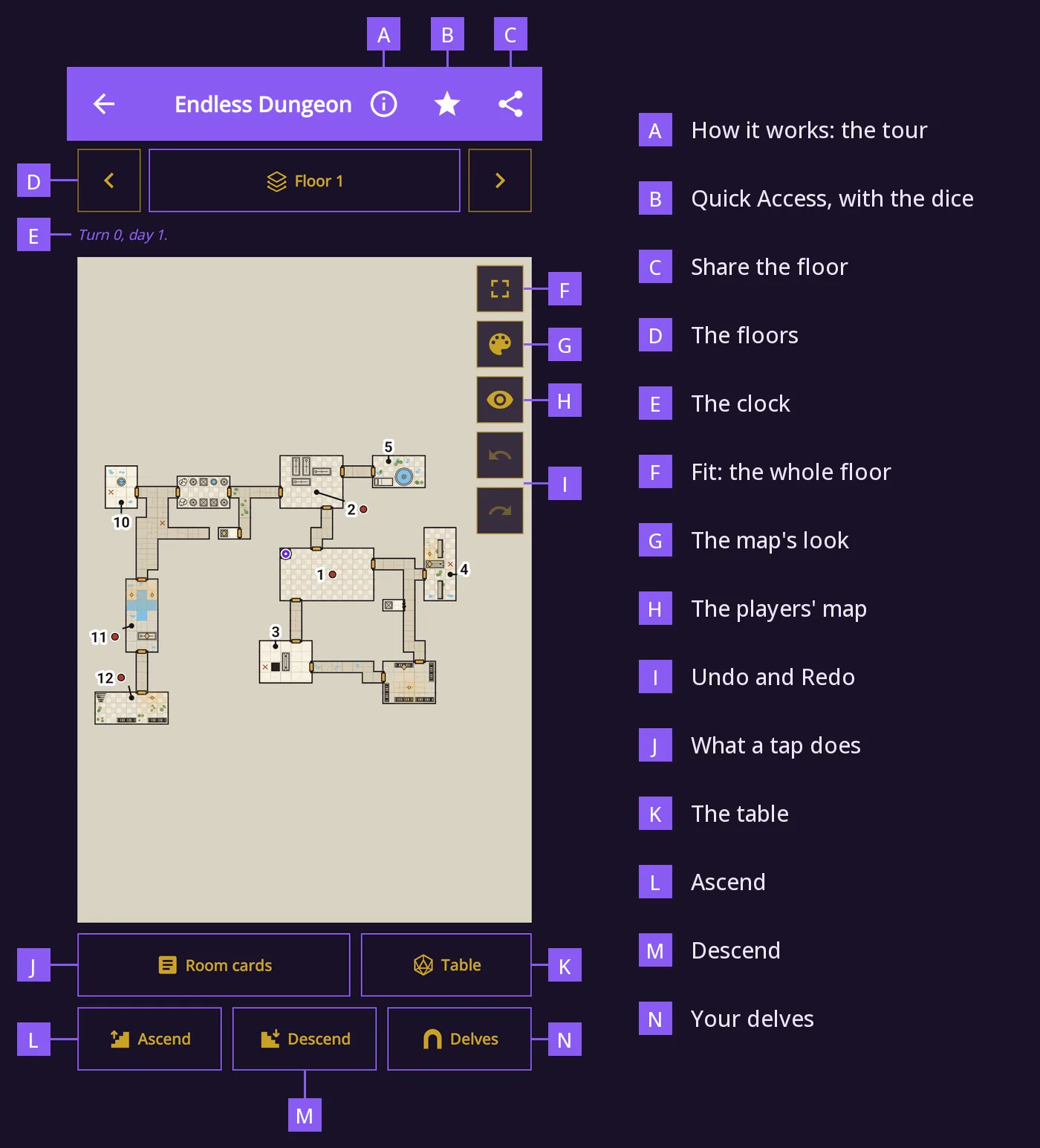
A new delve's entrance in the Ligne claire look, lettered A to N: the tour, Quick Access, Share, the floors, the clock, Fit, the map's look, the players' map, Undo and Redo, What a tap does, the table, Ascend, Descend and Your delves, with a key beside it. A new delve's entrance, and what each part of the screen does.

A room's card

With Room cards chosen, tap a room to read its card. It opens on what the party sees. Room 1 of this delve reads: "The Tide Halls. Damp hangs heavy, and every carving weeps with it." Then come its size, floor and light ("A landing, forty-five feet by twenty-five. Tiled floor. Dark. Old mosaics glint through a skin of silt.") and its ways out ("Doors north, east and south, to a corridor. Stairs up in the north-west corner: the way out."). Under For the GM is what only you know: "Wither-fiend, eating. The sounds of a meal carry far.", then what it carries.

At the table, you mark what became of each thing as play goes on. A creature is not yet met, met, fled, parleyed with or defeated; a trap is armed, spotted, disarmed or sprung; a hoard is not found, found or taken. The icon beside a creature opens its Bestiary sheet, and the one beside a hoard opens all it holds, from Treasure Hoards. Under them are Search this room, Reroll or lock a line, and Add this room to the Oracle's journal, and Edit, on the card, changes the room itself: its name, a note, its purpose and its floor's material, or its contents and its shape rolled again.
Room 1's card, The Tide Halls, then its At the table part with the Wither-fiend not yet met and the hoard not found, then the Wither-fiend's Bestiary sheet, then the hoard's popup, What a dead adventurer had left. Room 1's card, its creature's Bestiary sheet, and its hoard.

What a tap does

The button under the map says what a tap on the map does, and opens the list to change it: Room cards, Move the party, Lift the fog, Put back the fog or Edit the map. Each says what a tap will do, and the one in use is ticked.
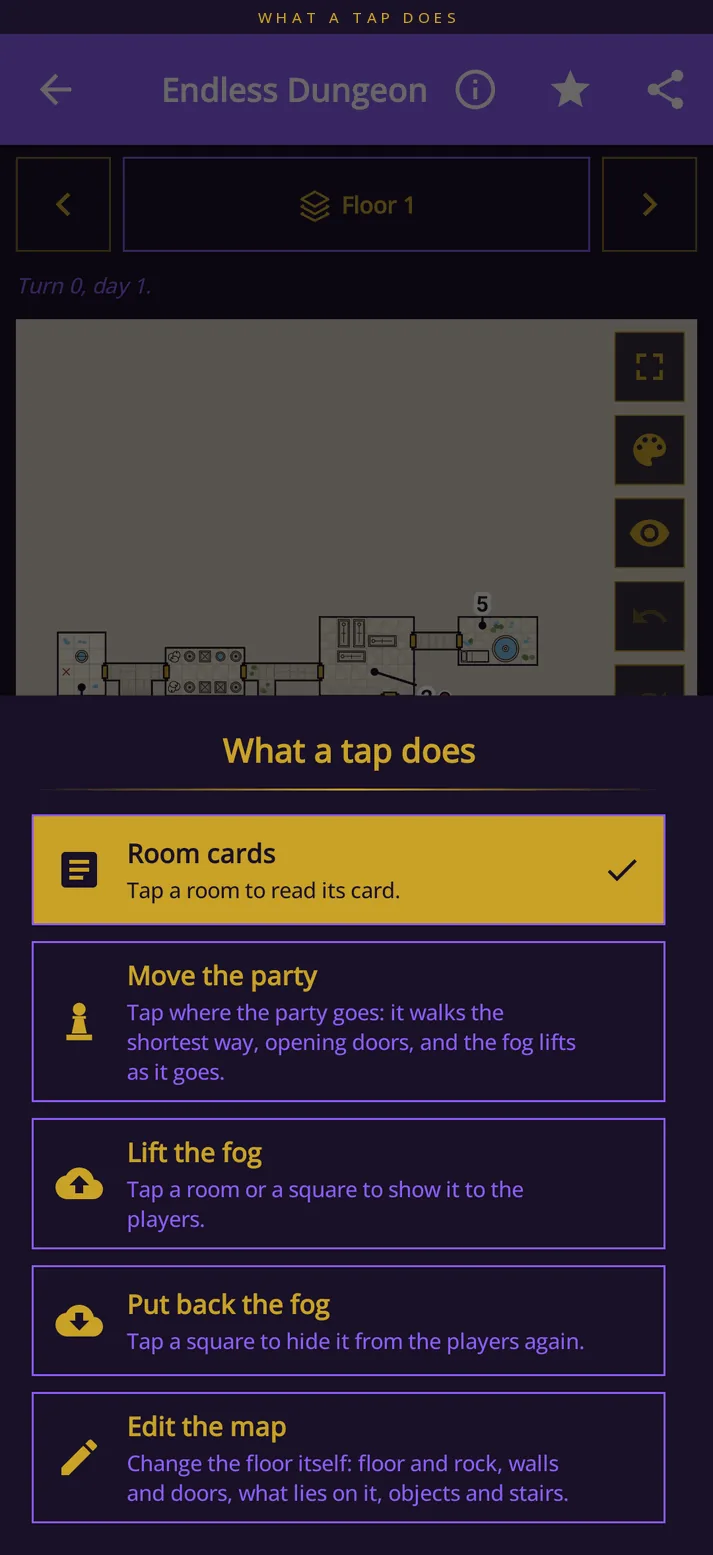
What a tap does, listing Room cards, ticked, Move the party, Lift the fog, Put back the fog and Edit the map, each with a line on what a tap does. What a tap does.

Moving the party

Pick Move the party, then tap where the party goes. In the app's words: "Tap where the party goes: it walks the shortest way, opening doors, and the fog lifts as it goes." With the fog on, the token keeps to what the players know, and the squares it walks become turns on the clock. A tap where the players know no way says so.

Here is the same walk on the players' map, the eye beside the map turned on: the party leaves Room 1 by its north door, climbs the corridor into Room 2 and leaves by its west door, and each room appears whole as the party steps into it.
The GM's map with Move the party chosen, then the players' map, where the party's token walks out of Room 1, up a corridor into Room 2 and out of its west door, each room appearing as the party enters. The party walks from Room 1 to Room 2 and on, seen on the players' map.

The fog

The players' map shows the floor as the players know it, with no secret of yours on it. A trap appears there only once it has been spotted, set off or disarmed. Lift the fog shows a room or a square to the players by hand, and Put back the fog hides a square again. Here, one tap on Room 3 shows it whole.
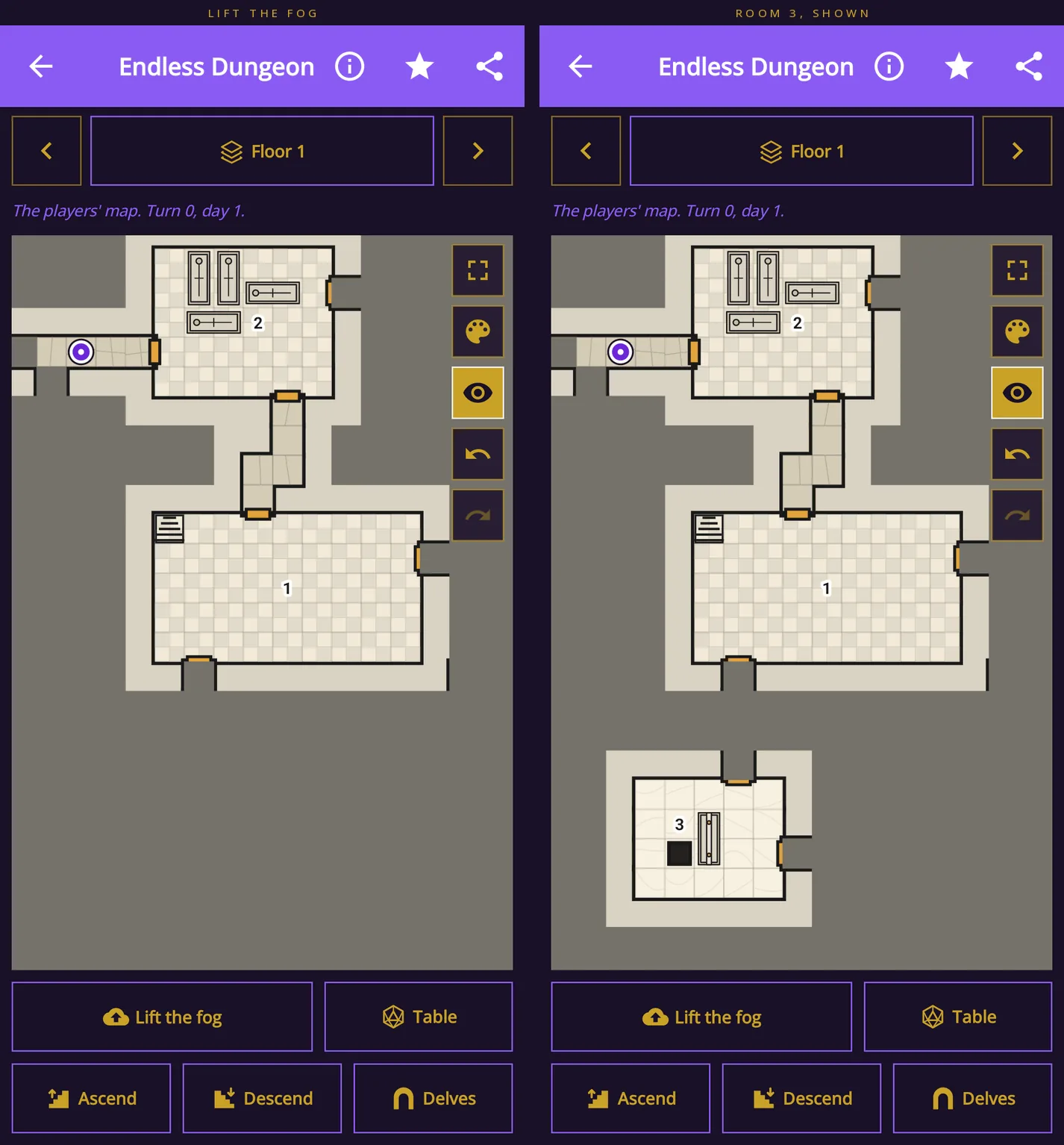
The players' map with Lift the fog chosen, beside the same map after a tap on Room 3, now shown whole. Lift the fog, and Room 3 shown to the players.

The table

Table, beside What a tap does, keeps the time and the light. "A turn is ten minutes. Moving, searching and resting pass them, and a wandering check may come with them." Next turn, Search the party's room, Short rest, Long rest and Next day pass the time. Under Light, the party takes up a torch, a lantern or a candle and lights it: "Each lit source burns down a turn at a time and goes out when it is spent." Five turns after it was lit, this torch has one turn left.

Further down are the map's own switches: the fog of war, how the fog lifts ("Room: a room shows whole as the party enters. Sight: what the token sees by its light. Hand: only where you tap."), the party's token, room numbers on the players' map and your marks for traps, groups, hoards and secret doors. Under The session are the log, Show the players and Redo.
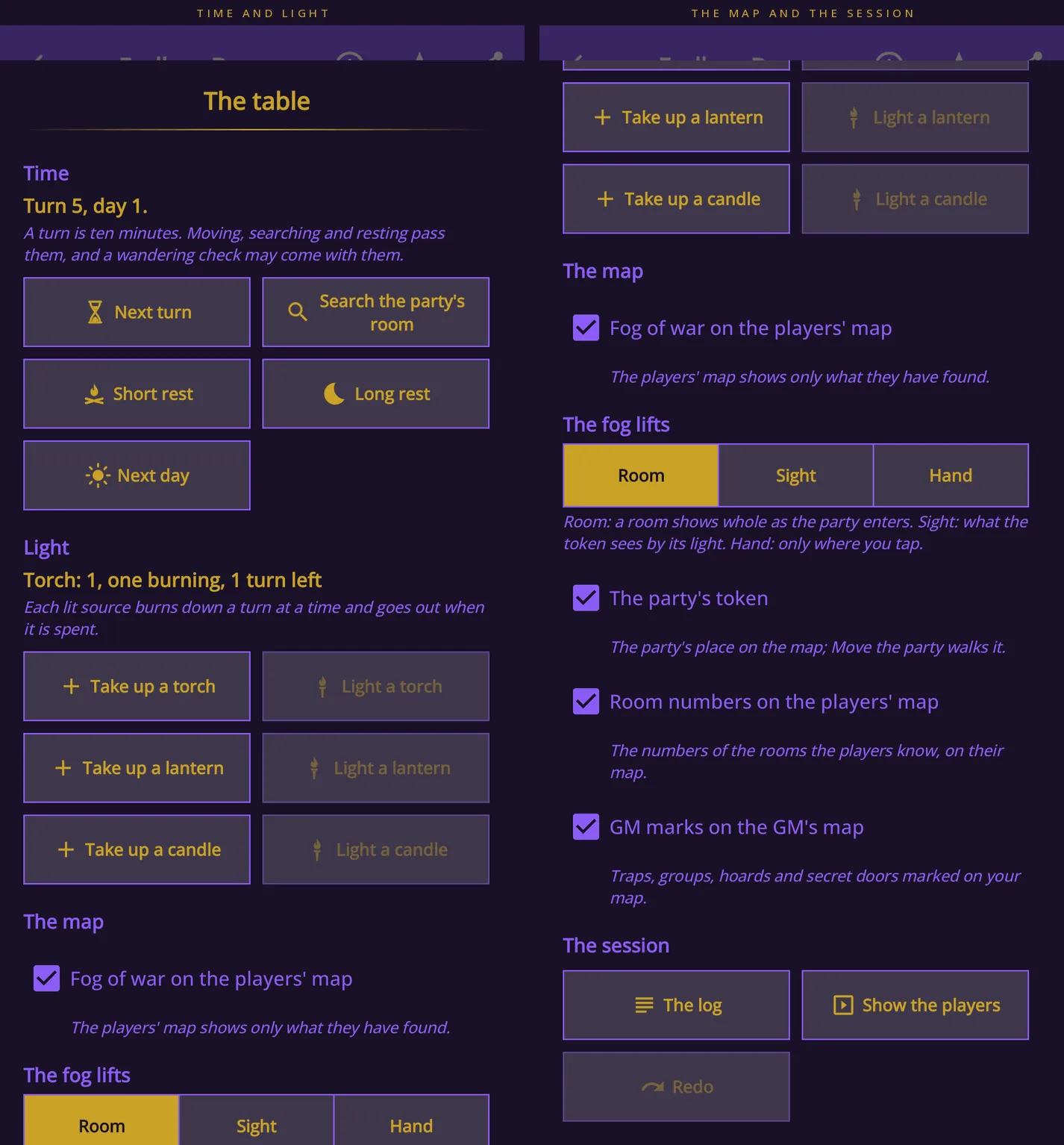
The table's time and light, Turn 5 with one torch burning and one turn left, beside its lower half: the fog of war, how the fog lifts, the token, room numbers, GM marks, the log and Show the players. The table: time and light, then the map and the session.

The log, and showing the players

The log keeps everything that happens, newest first, and narrows to one floor or one kind of entry. Here it holds the turns that passed and two wandering checks, such as "Turn 4, floor 1: A wandering check on turn four: nothing." Copy puts it on the clipboard, and Send to the Timeline Maker turns it into a timeline.

Show the players hands the phone over: the screen holds only the players' map, with nothing of yours on it. "Hold the map, or go back, to leave."
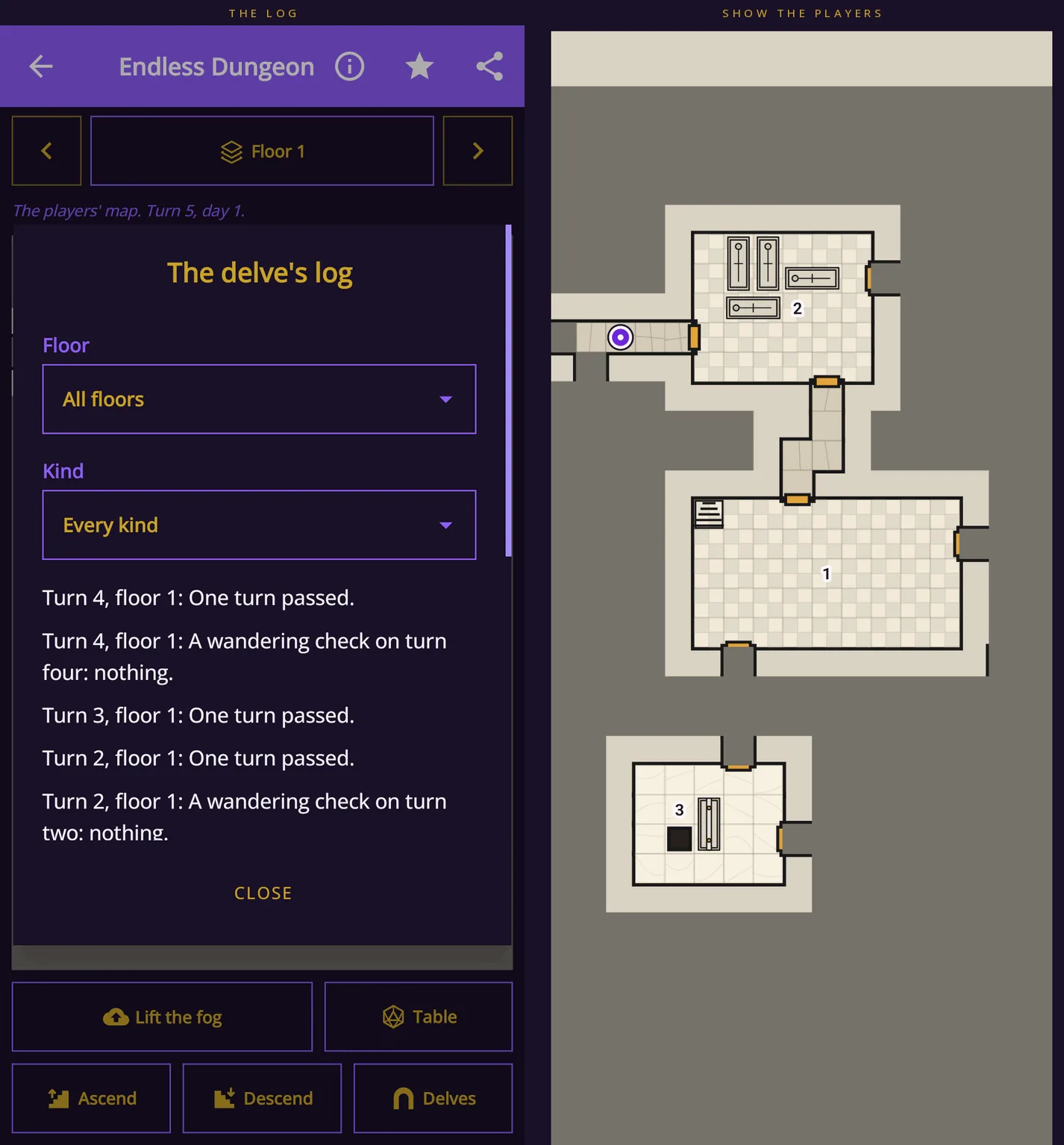
The delve's log, filtered by floor and by kind, its newest entries the turns and two wandering checks, beside the players' map shown full screen with nothing of the GM's on it. The log, and the screen the players see.

Going down

Descend takes the party down from its floor. The floor below is built the first time the party reaches it, and after that it stays as it was played. When a floor has more than one way down, Descend asks which: on this delve's second floor, a maze of passages, it offers the stairs in room 7 or a chute in room 5. The floor list marks the party's floor, and Ascend takes the party back up, and out of the dungeon from its entrance.
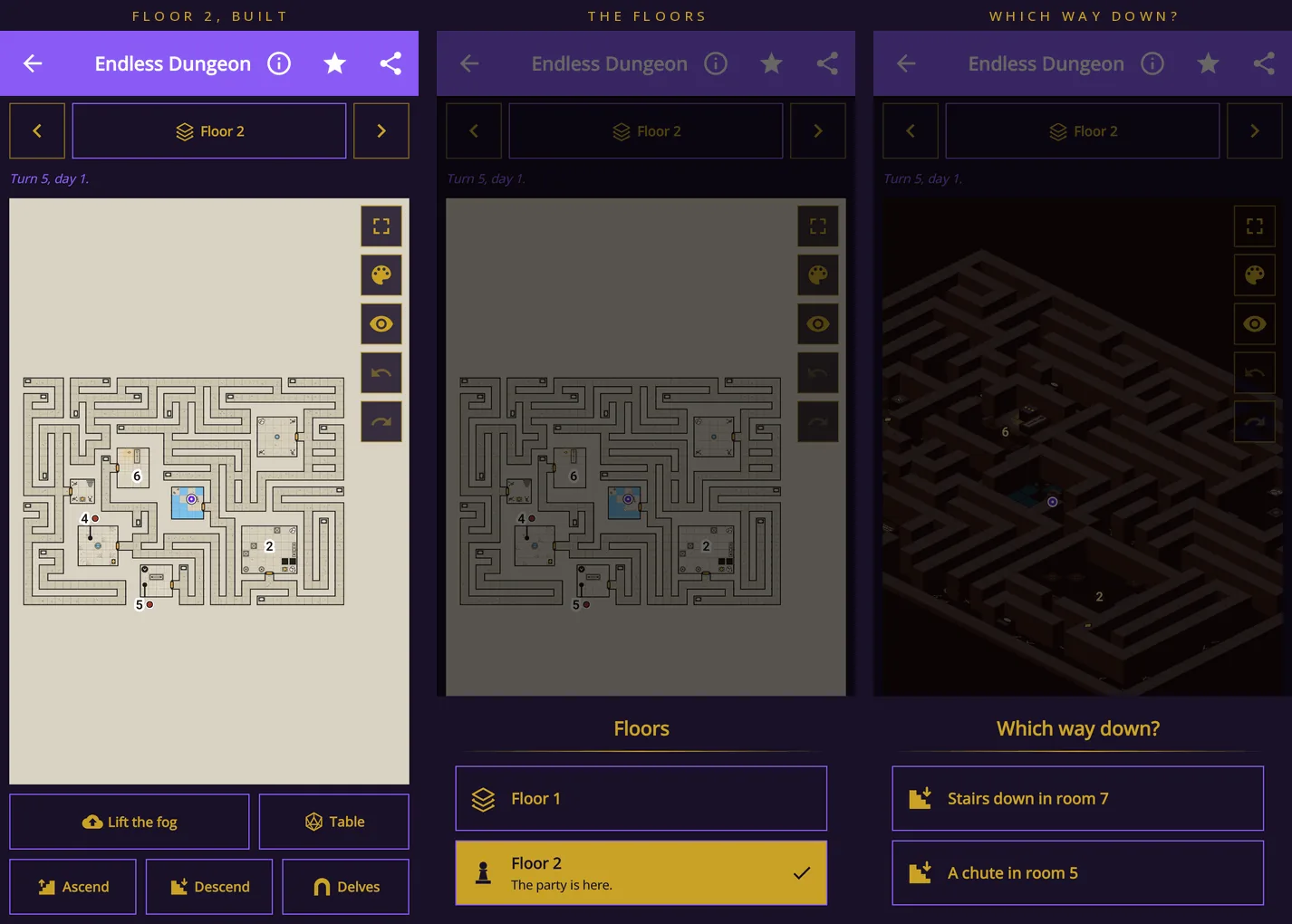
Floor 2, a maze of passages, on the GM's map, then the floor list with the party on floor 2, then Which way down? on floor 2, offering the stairs in room 7 or a chute in room 5. Floor 2, built as the party came down, the list of floors, and the ways down from floor 2.

Changing the map

Edit the map, the last choice under What a tap does, changes the floor itself. "Pick what a tap does to the map. Every edit keeps the floor whole, and Undo takes it back." Its tiles add floor or make rock, put up or take down a wall, put in or change a door, lay a liquid, a surface or a hazard, and add, move or take away an object or a stair. Liquid lists every liquid, shallow or deep.
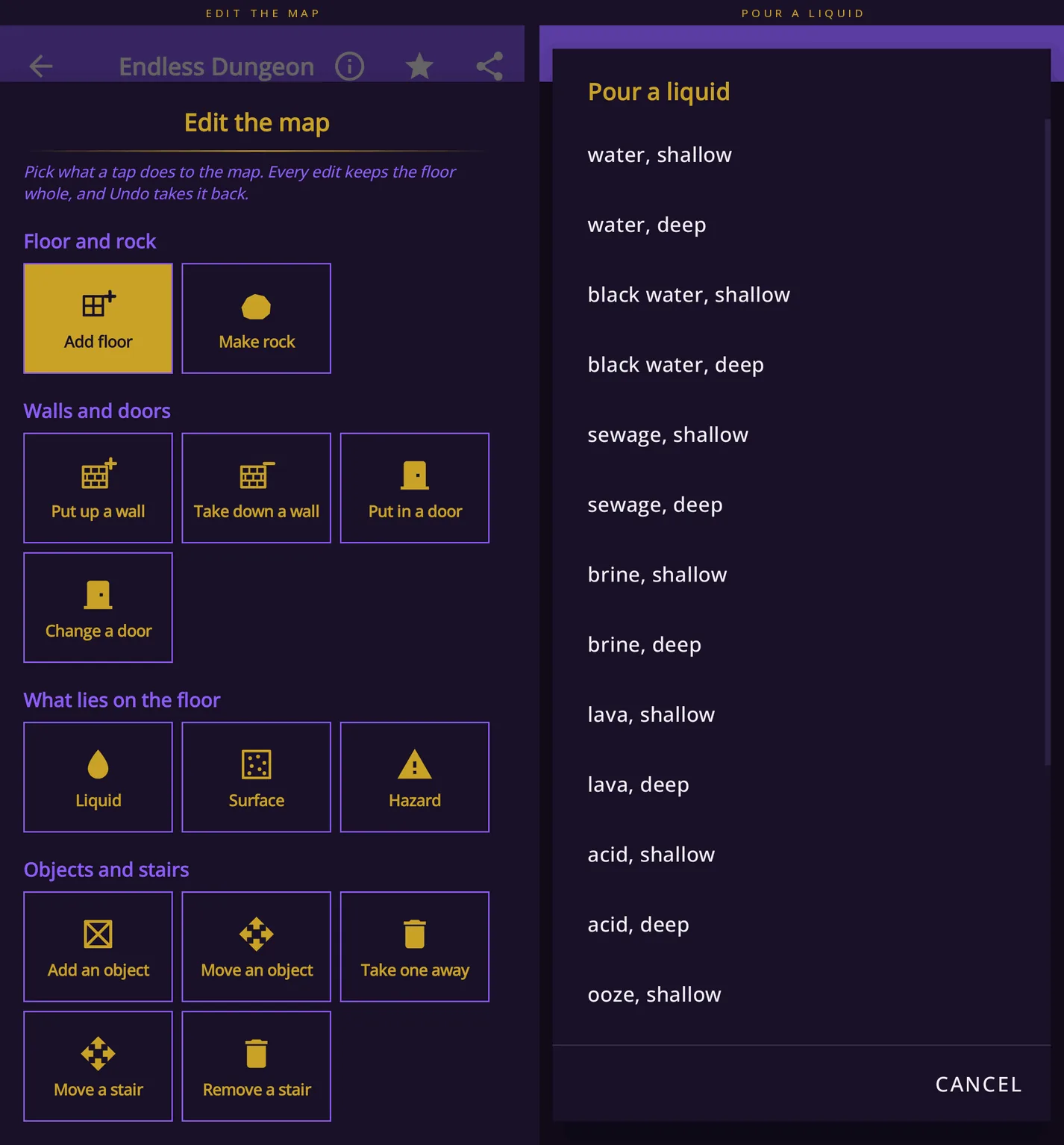
The Edit the map sheet with its tiles for floor and rock, walls and doors, what lies on the floor and objects and stairs, beside Pour a liquid, listing water, black water, sewage, brine, lava, acid and ooze, shallow and deep. Edit the map, and the liquids it can pour.

With deep water chosen, each tap pours it on one square, and each edit goes into the log. Whatever lay on the square, bones or rubble, goes under the water, and the room's number moves off the water as the pool grows. An edit that would cut a room off asks first. Here, on another delve drawn in Parchment, deep water fills the middle of Room 11.
Room 11 in the Parchment look after the hint Water, deep: tap the floor., deep water poured on it one square at a time until a pool of six squares fills its middle, the room's number moving off the water. Deep water poured into Room 11, a square at a time.

The look

The palette button beside the map opens the map's look. "Swipe through the looks: each card is this floor drawn in it. Tap one to use it." There are fourteen: Old-school blue, Hatched, Ligne claire, Parchment, Stone, Dark by torchlight, Deck plating, Blueprint, Graph paper, Fungal deep, Infernal, Frozen, Overgrown ruin and Bio-hive, and the ones that suit the delve's genre come first. Under them are the palette (As drawn, Warmer, Cooler or Muted), the brightness in five steps, the view from above or raised, and the extras: lighting, night, grime and mould on the walls, and sketchy lines.
The map's look, its cards swiped from Ligne claire through Parchment, Stone, Dark by torchlight, Graph paper, Fungal deep and Infernal to Frozen, each drawn from the floor on show. Swiping through the looks, each drawn from this very floor.

Isometric, under View, raises the floor: "From above, or raised, with its walls and objects standing." Front walls sets how much of the walls nearest you stands, full height, cut low or taken away, and a room you tap for its card has its front walls cut away so you can see into it.
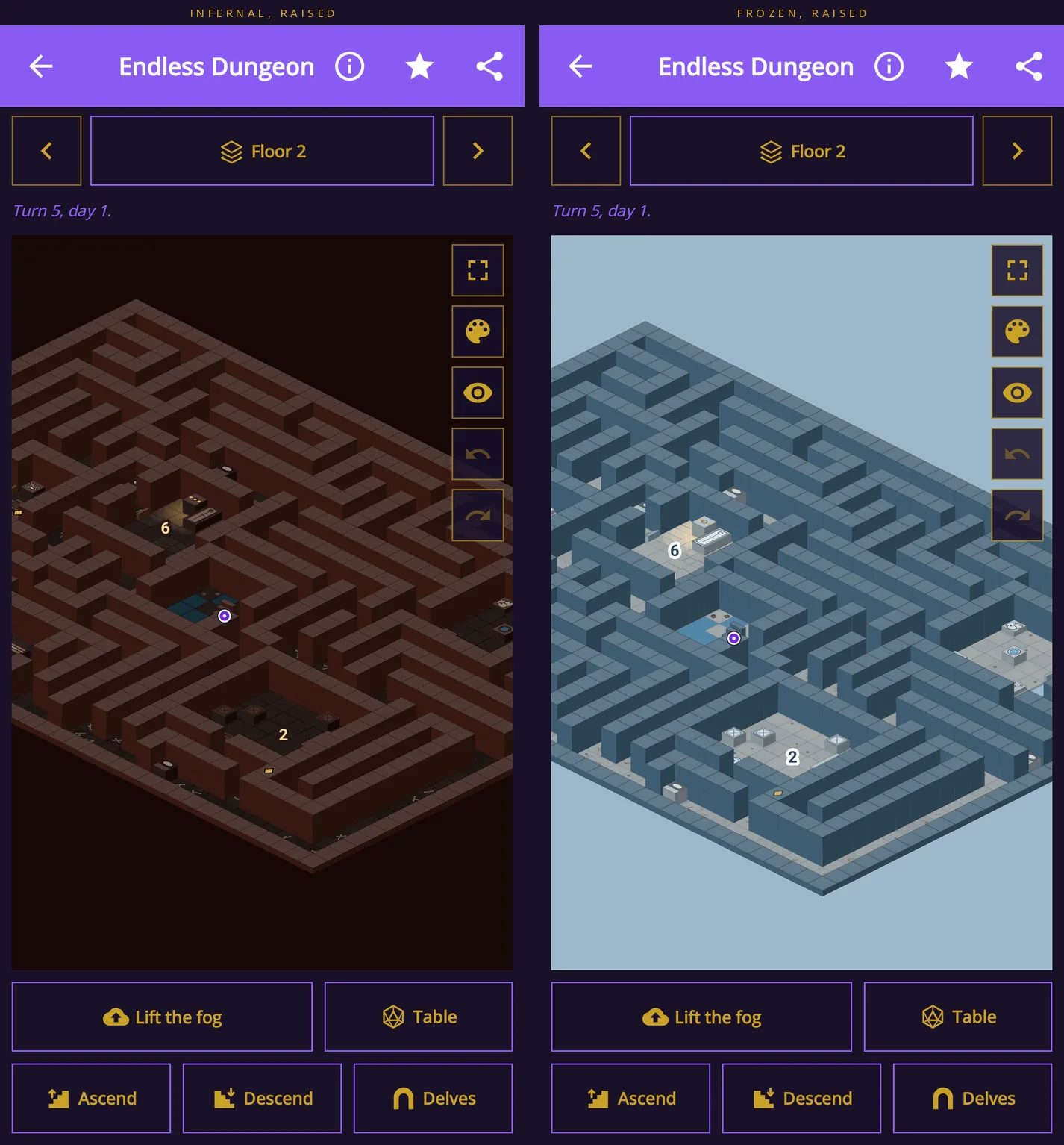
The same maze floor raised, in Infernal, dark red brick, and in Frozen, pale blue stone, its walls and objects standing and the party's token among them. The second floor raised, in Infernal and in Frozen.

Settings and presets

Delves, then Settings, holds every dial of the delve in play: how the floors are built, what fills them, the table's rules and the units. "A floor built from now on takes them; the floors built stay as they are, and New delve starts with them." Each dial has a line under it saying what it does. Presets saves the dials to begin a new delve from, and Every dial back to its default puts them back.
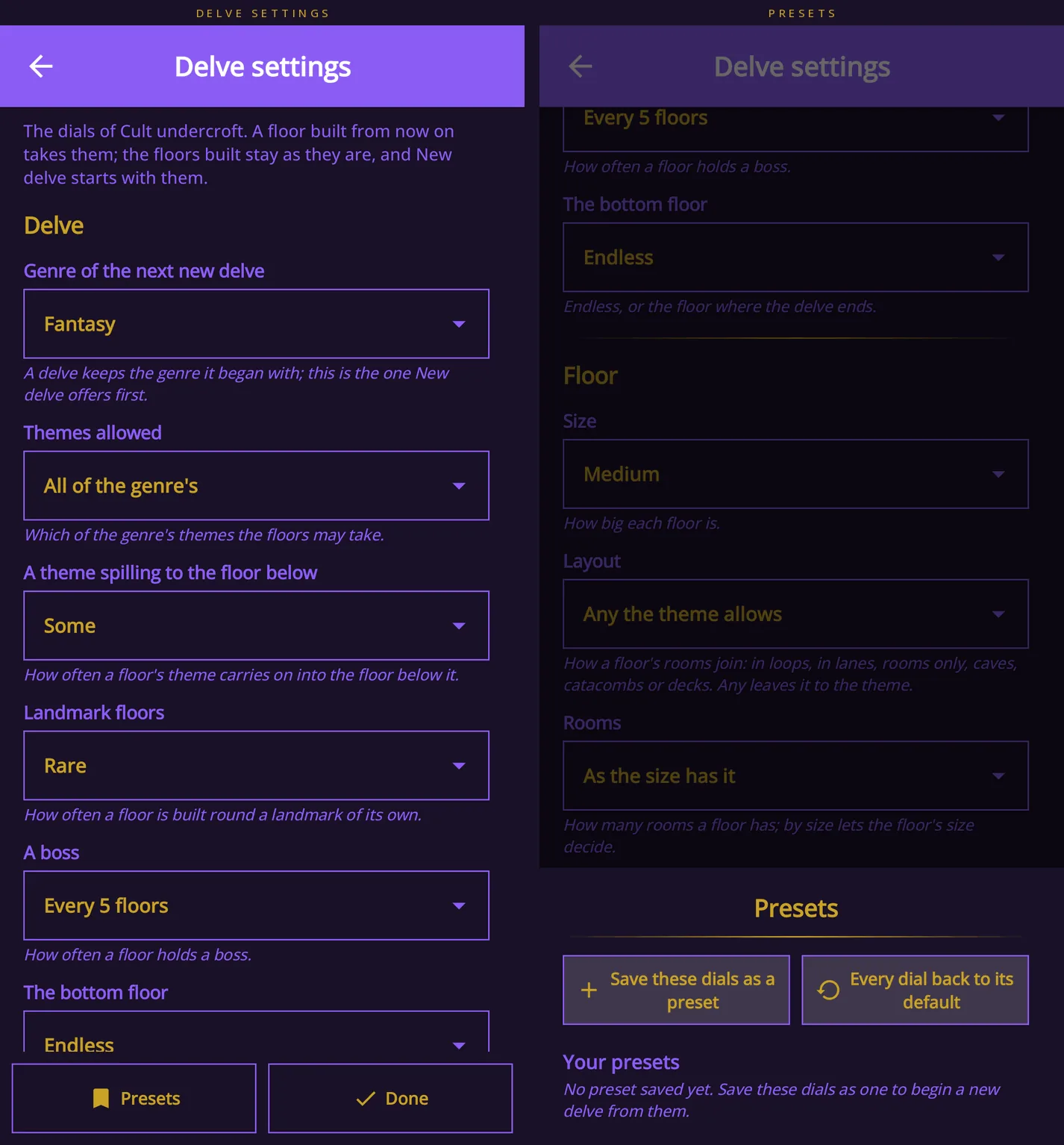
Delve settings for Cult undercroft, the dials of the delve with a line under each, beside Presets: Save these dials as a preset and Every dial back to its default. Delve settings, and Presets.

Sharing a floor

Share, at the top, exports the floor plan as a PNG or WEBP picture, or as a VTT file for a virtual tabletop. The picture can be the players', the GM's or both, of this floor or of every floor, and Add the text as a .txt file sends the room cards with it. "The players' picture shows only what they may see, with no GM fact. The GM's adds the room numbers, the secret doors, traps, groups and hoards, and its text is every room's card in order."
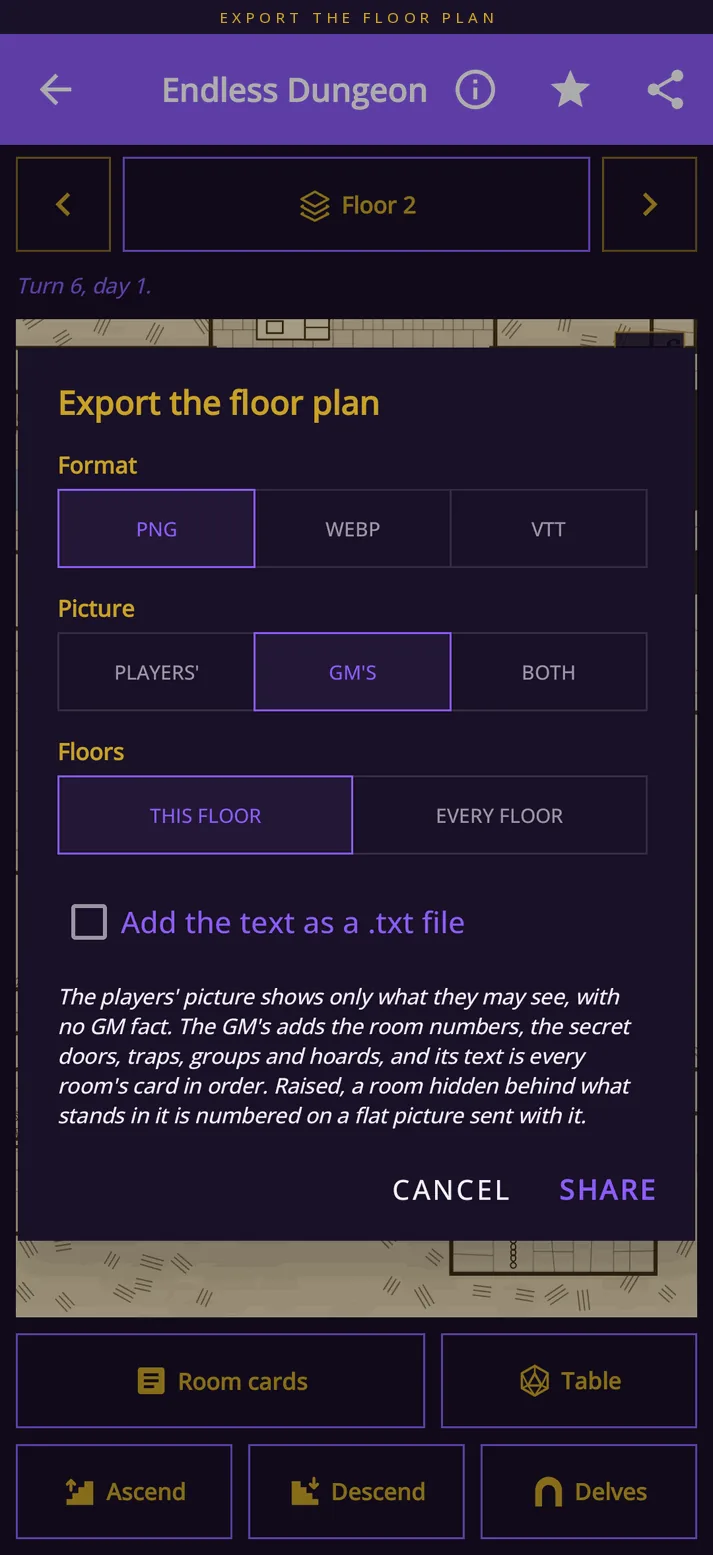
Export the floor plan, with PNG, the GM's picture and This floor chosen, a box to add the text as a .txt file, and a line on what each picture holds. Export the floor plan.

Favourites

Save to Favourites, in Delves, keeps the delve as it stands, in the folder you choose. Opened from Favourites, it shows its map, and Open in the generator brings it back as a copy to play on, so the saved one stays as it was.
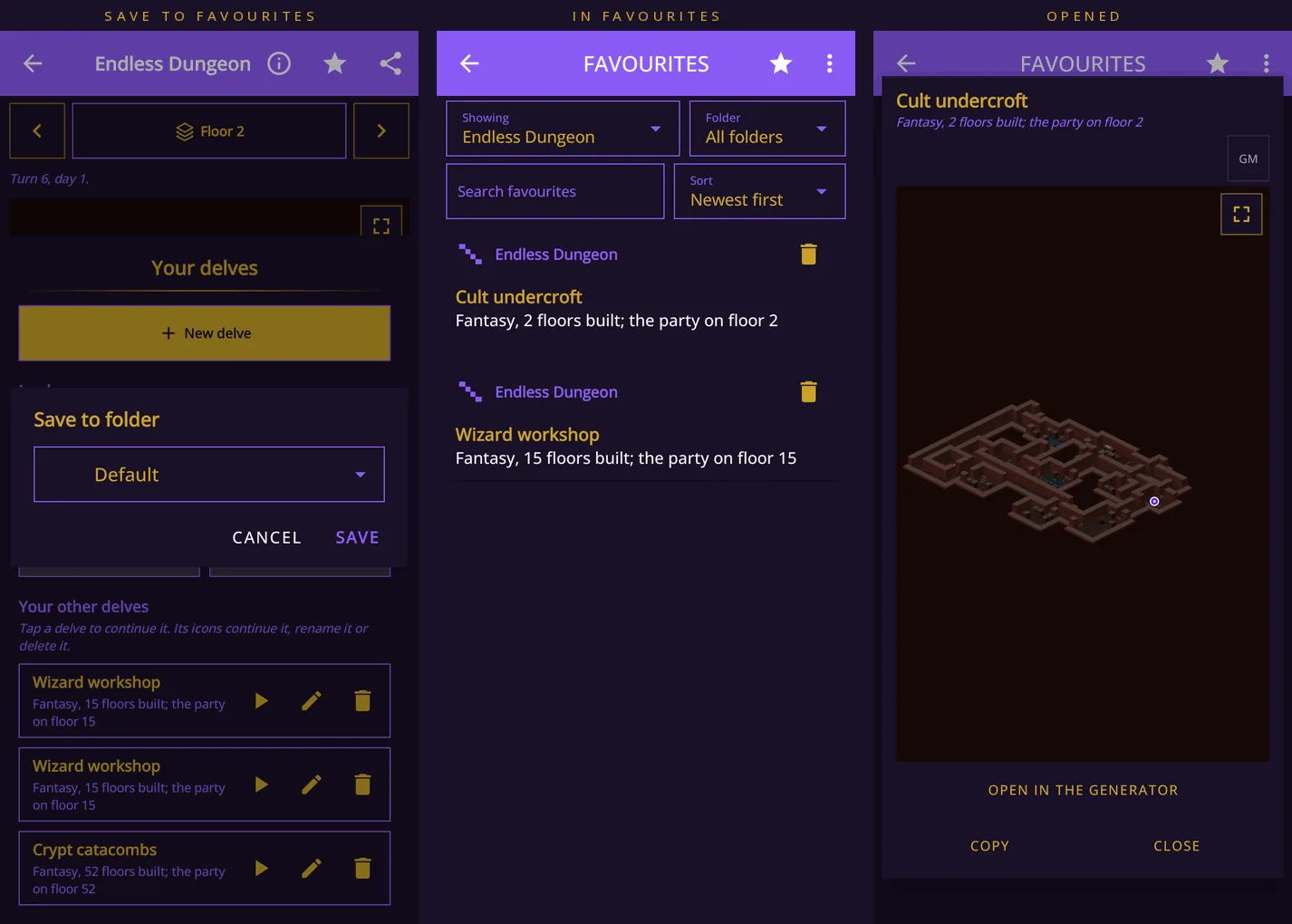
Save to folder over Your delves, then Favourites showing two delves, then Cult undercroft opened from Favourites, its floor raised in Infernal, with Open in the generator. Saved to Favourites, listed there, and opened.

On its side

Turn the phone on its side and the map takes the left of the screen, with the floors, the clock and the buttons in a column beside it. A turn keeps the floor, the view and any sheet you had open. While you look at another floor than the party's, the line under the floors says where the party is.
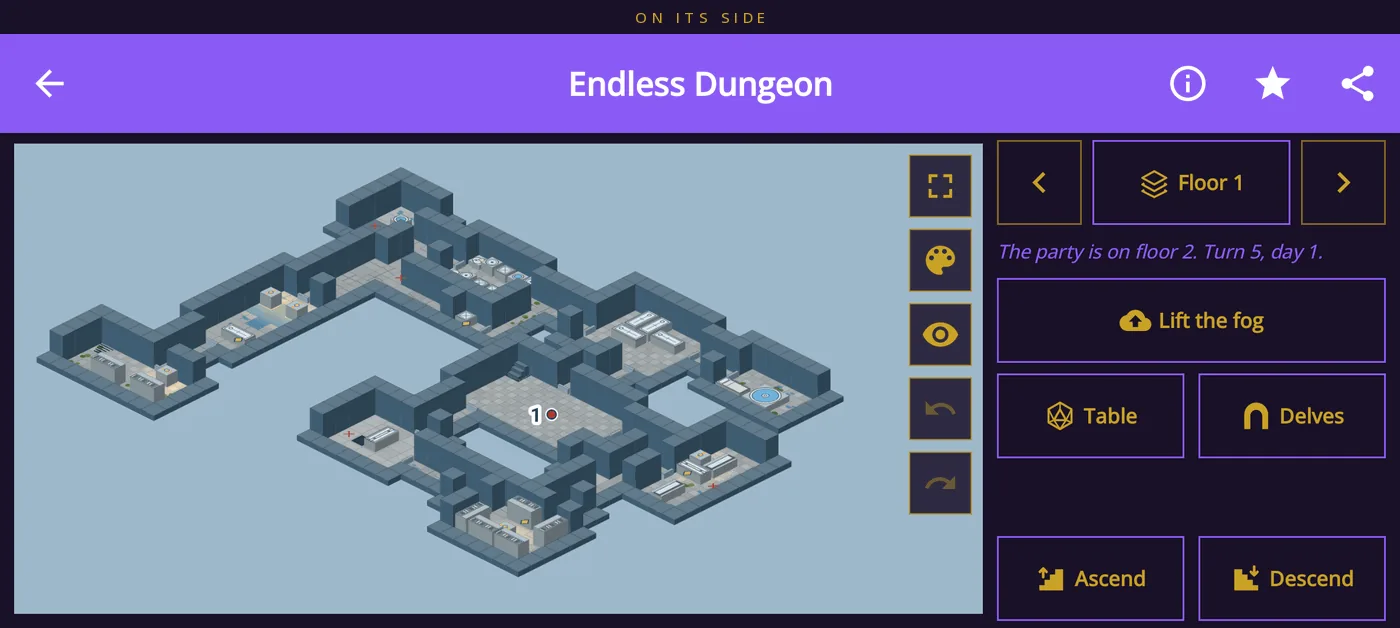
The Endless Dungeon on its side: floor 1 raised in Frozen on the left, and on the right the floors, the line The party is on floor 2. Turn 5, day 1., and the buttons. Floor 1 raised in Frozen, on its side, while the party is on floor 2.

The tour

The (i) at the top plays the tour again whenever you need it, each step showing the control it is about.
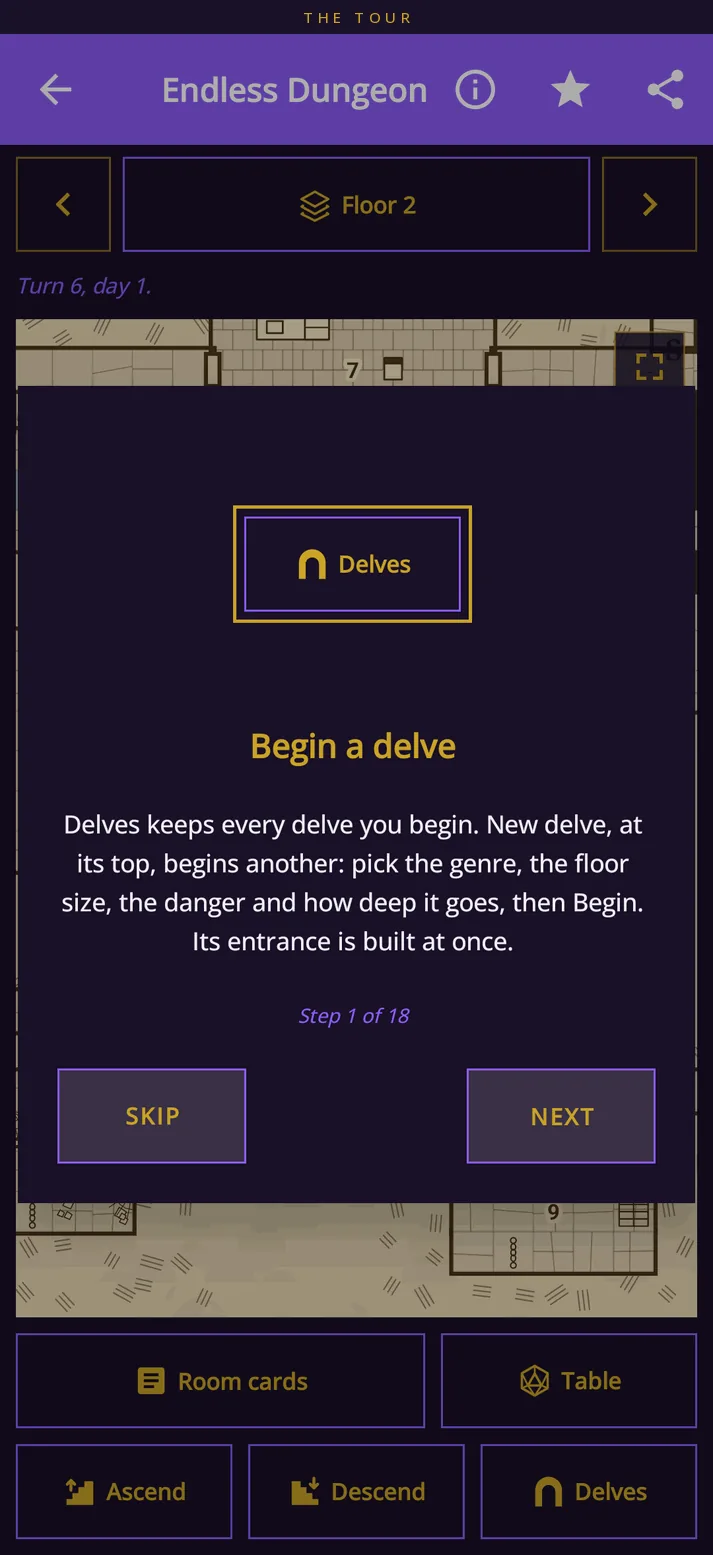
The tour's first step, Begin a delve, showing the Delves button, Step 1 of 18. The tour's first step.

Dice in Quick Access

Quick Access, the star at the top of a tool's screen, now has dice. Tap Dice under its title to open them. "Tap a die to add it to the throw, hold it to take one back." Three taps of the d6 make 3d6, and the line under the dice adds the throw up, here 3d6 + 1d20. Roll throws them over the screen you are on: the dice tumble in and land with their numbers up, and a box shows the throw and its total, 6 here, before it fades. "Roll throws them over this screen and keeps the throw for the next roll." A throw holds up to twenty dice, from d4 to d100, and Clear empties it.
Quick Access with its dice: three taps of the d6 make 3d6, a tap of the d20 adds 1d20, then Roll throws four dice over the Endless Dungeon, where they land on 1, 2, 1 and 2 under a box reading 3d6 + 1d20, 6. 3d6 and a d20, thrown over the Endless Dungeon.

Smaller Things

  • Map Maker: a long map name now stays inside the frame in the classic styles. Maps named before keep their title as it was.
  • Occult Seals: a seal no longer uses its own name as an ordinary word in its reading, as a seal named None did with "none but".
  • NEW badges: Taverns & Hubs, Mystery, Bill of Fare, Games of Chance and Interiors are no longer marked NEW in the hub. The Endless Dungeon, Treasure Hoards and the Name Sheet keep theirs.
  • What's new: 4.39.2 has its own tab beside the four before it.
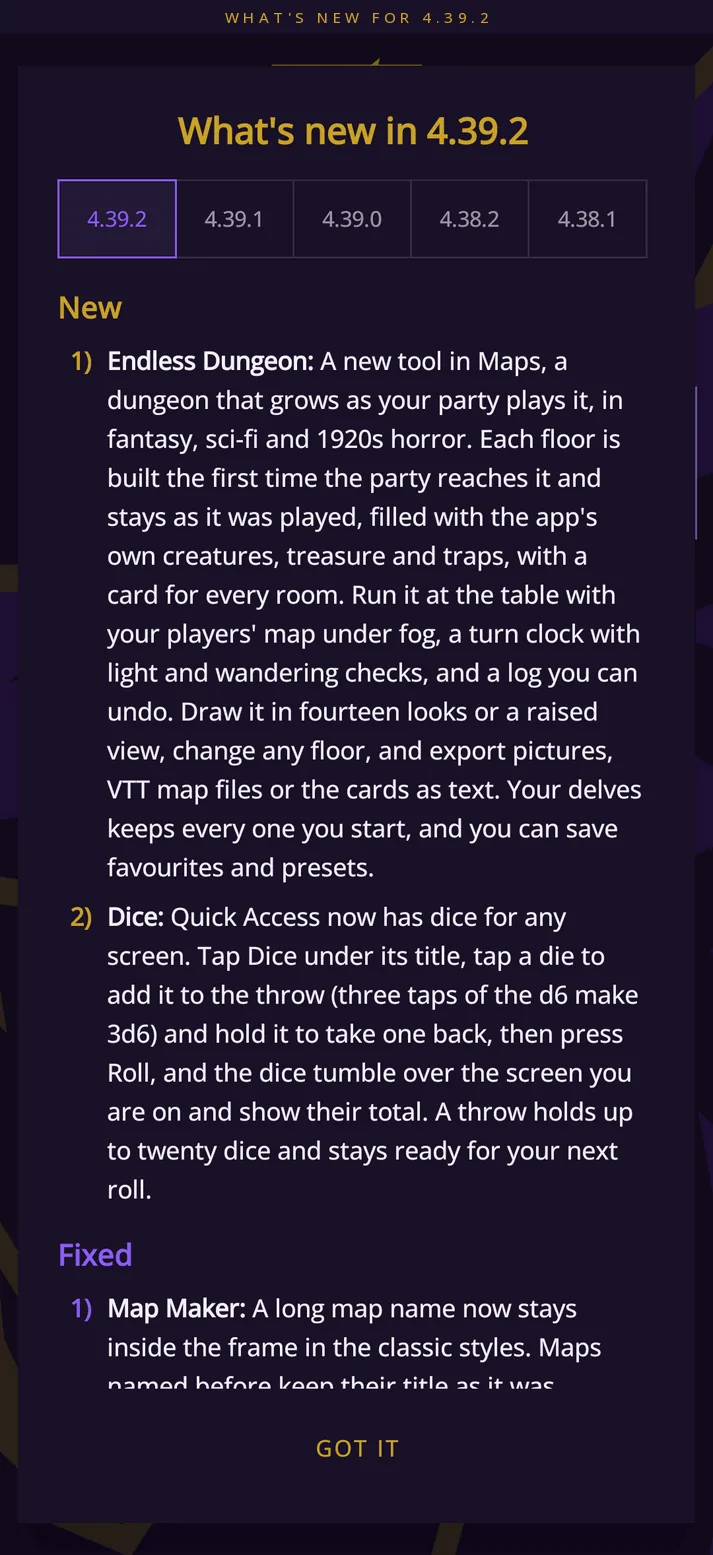
The What's new window on its 4.39.2 tab, with its New and Fixed lists. What's new for 4.39.2.

The Full Notes

Here is the list, word for word as the app shows it.

4.39.2

New

1) Endless Dungeon: A new tool in Maps, a dungeon that grows as your party plays it, in fantasy, sci-fi and 1920s horror. Each floor is built the first time the party reaches it and stays as it was played, filled with the app's own creatures, treasure and traps, with a card for every room. Run it at the table with your players' map under fog, a turn clock with light and wandering checks, and a log you can undo. Draw it in fourteen looks or a raised view, change any floor, and export pictures, VTT map files or the cards as text. Your delves keeps every one you start, and you can save favourites and presets.

2) Dice: Quick Access now has dice for any screen. Tap Dice under its title, tap a die to add it to the throw (three taps of the d6 make 3d6) and hold it to take one back, then press Roll, and the dice tumble over the screen you are on and show their total. A throw holds up to twenty dice and stays ready for your next roll.

Fixed

1) Map Maker: A long map name now stays inside the frame in the classic styles. Maps named before keep their title as it was.

2) Occult Seals: A seal no longer uses its own name as an ordinary word in its reading, as a seal named None did with "none but".

Your Saves Are Safe

Every favourite, preset, note, campaign, map and setting you already have opens and looks the way it did before. A Map Maker map named before this version keeps its title exactly as it was, and every Occult Seal you saved reads as it did. The Endless Dungeon keeps every delve, preset and favourite you make from now on, and Quick Access keeps your last throw ready.

Version 4.39.2 is free on Google Play now.


Download Fantasy World Generator

A dungeon that grows as you play, and dice for every screen.

A Dungeon That Grows as You Play, and Everything Else in 4.39.2

Version 4.39.2 is out, and its biggest change is a new tool in Maps, the Endless Dungeon. It is a dungeon that grows as your party plays it: each floor is built the first time the party goes down to it, every room has a card, and you run it at the table with your players' map under fog, a turn clock, light and a log you can undo. Quick Access also has dice now, thrown over whatever screen you are on. This post lists everything first, then walks through the Endless Dungeon step by step, in the order you meet each part of it at the table.

4.39.2 at a Glance

  • Endless Dungeon: a new tool in Maps, in fantasy, sci-fi and 1920s horror. Each floor is built the first time the party reaches it, filled with the app's own creatures, treasure and traps, and stays as it was played.
  • Room cards: every room has a card, with what the party sees first and then, for you alone, who is there, its traps and its treasure, linked to the Bestiary and Treasure Hoards.
  • At the table: the party's token walks the shortest way and opens doors, the fog lifts on the players' map as they go, and the table keeps turns, rests, days, light and wandering checks, with a log and Show the players.
  • Changing a floor: floor and rock, walls and doors, liquids, surfaces, hazards, objects and stairs, each edit checked against the floor's rules and taken back with Undo.
  • Looks: fourteen looks drawn from the floor itself, four palettes, five steps of brightness, a raised view, and lighting, night, grime, mould and sketchy lines.
  • Your delves: every delve you begin is kept. Settings and presets set how its floors are built, favourites keep a delve as it stands, and Share exports pictures, VTT map files and the room cards as text.
  • Dice: Quick Access has dice from d4 to d100, up to twenty in a throw, thrown over the screen you are on.
  • Fixes: a long name on a classic Map Maker map stays inside its frame, and an Occult Seal no longer reads its own name as an ordinary word.
  • NEW badges: Taverns & Hubs, Mystery, Bill of Fare, Games of Chance and Interiors are no longer marked new.

Your saves: everything you saved opens exactly as it did.

The Endless Dungeon, Step by Step

The Endless Dungeon is in the Generators hub, under Maps. The first time you open it, a tour of eighteen steps shows each part of the screen in the order you meet it, and the (i) at the top plays it again later. The steps below follow the same order, on a fantasy delve begun from the defaults.

Beginning a delve

Delves, at the bottom of the screen, keeps every delve you begin. New delve, at its top, begins another. Pick the genre (fantasy, sci-fi or 1920s horror), the floor size (small, medium, large or huge), the danger, which is "How fast the creatures and traps grow harder as the party goes down.", and how deep it goes: endless, or a floor where the delve ends. Every other setting comes "From the delve in play, from the defaults, or from a preset saved in the settings." Begin builds the entrance at once, and each floor below is built the first time the party goes down to it.

Your delves, with the delve in play and three others, beside New delve with Fantasy, Medium and Steady chosen, How deep set to Endless and every other setting from the defaults. Your delves, and New delve.

The screen

Here is the new delve's entrance, drawn in the Ligne claire look. At the top are the floors: the arrows step through the floors built so far, and the floor's name opens the list of them all. Under them, the clock keeps the time, a turn being ten minutes. You drag the map to look round, and pinch or tap twice to zoom. The buttons down its right side fit the whole floor on screen again, change the map's look, switch to the players' map, and undo or redo; hold one to read its name.

On the GM's map, the purple ring is the party's token, a red dot after a room's number is a group of creatures, a red cross is a trap and a gold diamond is a hoard. Under the map are What a tap does, the table, Ascend, Descend and Your delves.

A new delve's entrance in the Ligne claire look, lettered A to N: the tour, Quick Access, Share, the floors, the clock, Fit, the map's look, the players' map, Undo and Redo, What a tap does, the table, Ascend, Descend and Your delves, with a key beside it. A new delve's entrance, and what each part of the screen does.

A room's card

With Room cards chosen, tap a room to read its card. It opens on what the party sees. Room 1 of this delve reads: "The Tide Halls. Damp hangs heavy, and every carving weeps with it." Then come its size, floor and light ("A landing, forty-five feet by twenty-five. Tiled floor. Dark. Old mosaics glint through a skin of silt.") and its ways out ("Doors north, east and south, to a corridor. Stairs up in the north-west corner: the way out."). Under For the GM is what only you know: "Wither-fiend, eating. The sounds of a meal carry far.", then what it carries.

At the table, you mark what became of each thing as play goes on. A creature is not yet met, met, fled, parleyed with or defeated; a trap is armed, spotted, disarmed or sprung; a hoard is not found, found or taken. The icon beside a creature opens its Bestiary sheet, and the one beside a hoard opens all it holds, from Treasure Hoards. Under them are Search this room, Reroll or lock a line, and Add this room to the Oracle's journal, and Edit, on the card, changes the room itself: its name, a note, its purpose and its floor's material, or its contents and its shape rolled again.

Room 1's card, The Tide Halls, then its At the table part with the Wither-fiend not yet met and the hoard not found, then the Wither-fiend's Bestiary sheet, then the hoard's popup, What a dead adventurer had left. Room 1's card, its creature's Bestiary sheet, and its hoard.

What a tap does

The button under the map says what a tap on the map does, and opens the list to change it: Room cards, Move the party, Lift the fog, Put back the fog or Edit the map. Each says what a tap will do, and the one in use is ticked.

What a tap does, listing Room cards, ticked, Move the party, Lift the fog, Put back the fog and Edit the map, each with a line on what a tap does. What a tap does.

Moving the party

Pick Move the party, then tap where the party goes. In the app's words: "Tap where the party goes: it walks the shortest way, opening doors, and the fog lifts as it goes." With the fog on, the token keeps to what the players know, and the squares it walks become turns on the clock. A tap where the players know no way says so.

Here is the same walk on the players' map, the eye beside the map turned on: the party leaves Room 1 by its north door, climbs the corridor into Room 2 and leaves by its west door, and each room appears whole as the party steps into it.

The GM's map with Move the party chosen, then the players' map, where the party's token walks out of Room 1, up a corridor into Room 2 and out of its west door, each room appearing as the party enters. The party walks from Room 1 to Room 2 and on, seen on the players' map.

The fog

The players' map shows the floor as the players know it, with no secret of yours on it. A trap appears there only once it has been spotted, set off or disarmed. Lift the fog shows a room or a square to the players by hand, and Put back the fog hides a square again. Here, one tap on Room 3 shows it whole.

The players' map with Lift the fog chosen, beside the same map after a tap on Room 3, now shown whole. Lift the fog, and Room 3 shown to the players.

The table

Table, beside What a tap does, keeps the time and the light. "A turn is ten minutes. Moving, searching and resting pass them, and a wandering check may come with them." Next turn, Search the party's room, Short rest, Long rest and Next day pass the time. Under Light, the party takes up a torch, a lantern or a candle and lights it: "Each lit source burns down a turn at a time and goes out when it is spent." Five turns after it was lit, this torch has one turn left.

Further down are the map's own switches: the fog of war, how the fog lifts ("Room: a room shows whole as the party enters. Sight: what the token sees by its light. Hand: only where you tap."), the party's token, room numbers on the players' map and your marks for traps, groups, hoards and secret doors. Under The session are the log, Show the players and Redo.

The table's time and light, Turn 5 with one torch burning and one turn left, beside its lower half: the fog of war, how the fog lifts, the token, room numbers, GM marks, the log and Show the players. The table: time and light, then the map and the session.

The log, and showing the players

The log keeps everything that happens, newest first, and narrows to one floor or one kind of entry. Here it holds the turns that passed and two wandering checks, such as "Turn 4, floor 1: A wandering check on turn four: nothing." Copy puts it on the clipboard, and Send to the Timeline Maker turns it into a timeline.

Show the players hands the phone over: the screen holds only the players' map, with nothing of yours on it. "Hold the map, or go back, to leave."

The delve's log, filtered by floor and by kind, its newest entries the turns and two wandering checks, beside the players' map shown full screen with nothing of the GM's on it. The log, and the screen the players see.

Going down

Descend takes the party down from its floor. The floor below is built the first time the party reaches it, and after that it stays as it was played. When a floor has more than one way down, Descend asks which: on this delve's second floor, a maze of passages, it offers the stairs in room 7 or a chute in room 5. The floor list marks the party's floor, and Ascend takes the party back up, and out of the dungeon from its entrance.

Floor 2, a maze of passages, on the GM's map, then the floor list with the party on floor 2, then Which way down? on floor 2, offering the stairs in room 7 or a chute in room 5. Floor 2, built as the party came down, the list of floors, and the ways down from floor 2.

Changing the map

Edit the map, the last choice under What a tap does, changes the floor itself. "Pick what a tap does to the map. Every edit keeps the floor whole, and Undo takes it back." Its tiles add floor or make rock, put up or take down a wall, put in or change a door, lay a liquid, a surface or a hazard, and add, move or take away an object or a stair. Liquid lists every liquid, shallow or deep.

The Edit the map sheet with its tiles for floor and rock, walls and doors, what lies on the floor and objects and stairs, beside Pour a liquid, listing water, black water, sewage, brine, lava, acid and ooze, shallow and deep. Edit the map, and the liquids it can pour.

With deep water chosen, each tap pours it on one square, and each edit goes into the log. Whatever lay on the square, bones or rubble, goes under the water, and the room's number moves off the water as the pool grows. An edit that would cut a room off asks first. Here, on another delve drawn in Parchment, deep water fills the middle of Room 11.

Room 11 in the Parchment look after the hint Water, deep: tap the floor., deep water poured on it one square at a time until a pool of six squares fills its middle, the room's number moving off the water. Deep water poured into Room 11, a square at a time.

The look

The palette button beside the map opens the map's look. "Swipe through the looks: each card is this floor drawn in it. Tap one to use it." There are fourteen: Old-school blue, Hatched, Ligne claire, Parchment, Stone, Dark by torchlight, Deck plating, Blueprint, Graph paper, Fungal deep, Infernal, Frozen, Overgrown ruin and Bio-hive, and the ones that suit the delve's genre come first. Under them are the palette (As drawn, Warmer, Cooler or Muted), the brightness in five steps, the view from above or raised, and the extras: lighting, night, grime and mould on the walls, and sketchy lines.

The map's look, its cards swiped from Ligne claire through Parchment, Stone, Dark by torchlight, Graph paper, Fungal deep and Infernal to Frozen, each drawn from the floor on show. Swiping through the looks, each drawn from this very floor.

Isometric, under View, raises the floor: "From above, or raised, with its walls and objects standing." Front walls sets how much of the walls nearest you stands, full height, cut low or taken away, and a room you tap for its card has its front walls cut away so you can see into it.

The same maze floor raised, in Infernal, dark red brick, and in Frozen, pale blue stone, its walls and objects standing and the party's token among them. The second floor raised, in Infernal and in Frozen.

Settings and presets

Delves, then Settings, holds every dial of the delve in play: how the floors are built, what fills them, the table's rules and the units. "A floor built from now on takes them; the floors built stay as they are, and New delve starts with them." Each dial has a line under it saying what it does. Presets saves the dials to begin a new delve from, and Every dial back to its default puts them back.

Delve settings for Cult undercroft, the dials of the delve with a line under each, beside Presets: Save these dials as a preset and Every dial back to its default. Delve settings, and Presets.

Sharing a floor

Share, at the top, exports the floor plan as a PNG or WEBP picture, or as a VTT file for a virtual tabletop. The picture can be the players', the GM's or both, of this floor or of every floor, and Add the text as a .txt file sends the room cards with it. "The players' picture shows only what they may see, with no GM fact. The GM's adds the room numbers, the secret doors, traps, groups and hoards, and its text is every room's card in order."

Export the floor plan, with PNG, the GM's picture and This floor chosen, a box to add the text as a .txt file, and a line on what each picture holds. Export the floor plan.

Favourites

Save to Favourites, in Delves, keeps the delve as it stands, in the folder you choose. Opened from Favourites, it shows its map, and Open in the generator brings it back as a copy to play on, so the saved one stays as it was.

Save to folder over Your delves, then Favourites showing two delves, then Cult undercroft opened from Favourites, its floor raised in Infernal, with Open in the generator. Saved to Favourites, listed there, and opened.

On its side

Turn the phone on its side and the map takes the left of the screen, with the floors, the clock and the buttons in a column beside it. A turn keeps the floor, the view and any sheet you had open. While you look at another floor than the party's, the line under the floors says where the party is.

The Endless Dungeon on its side: floor 1 raised in Frozen on the left, and on the right the floors, the line The party is on floor 2. Turn 5, day 1., and the buttons. Floor 1 raised in Frozen, on its side, while the party is on floor 2.

The tour

The (i) at the top plays the tour again whenever you need it, each step showing the control it is about.

The tour's first step, Begin a delve, showing the Delves button, Step 1 of 18. The tour's first step.

Dice in Quick Access

Quick Access, the star at the top of a tool's screen, now has dice. Tap Dice under its title to open them. "Tap a die to add it to the throw, hold it to take one back." Three taps of the d6 make 3d6, and the line under the dice adds the throw up, here 3d6 + 1d20. Roll throws them over the screen you are on: the dice tumble in and land with their numbers up, and a box shows the throw and its total, 6 here, before it fades. "Roll throws them over this screen and keeps the throw for the next roll." A throw holds up to twenty dice, from d4 to d100, and Clear empties it.

Quick Access with its dice: three taps of the d6 make 3d6, a tap of the d20 adds 1d20, then Roll throws four dice over the Endless Dungeon, where they land on 1, 2, 1 and 2 under a box reading 3d6 + 1d20, 6. 3d6 and a d20, thrown over the Endless Dungeon.

Smaller Things

  • Map Maker: a long map name now stays inside the frame in the classic styles. Maps named before keep their title as it was.
  • Occult Seals: a seal no longer uses its own name as an ordinary word in its reading, as a seal named None did with "none but".
  • NEW badges: Taverns & Hubs, Mystery, Bill of Fare, Games of Chance and Interiors are no longer marked NEW in the hub. The Endless Dungeon, Treasure Hoards and the Name Sheet keep theirs.
  • What's new: 4.39.2 has its own tab beside the four before it.

The What's new window on its 4.39.2 tab, with its New and Fixed lists. What's new for 4.39.2.

The Full Notes

Here is the list, word for word as the app shows it.

4.39.2

New

1) Endless Dungeon: A new tool in Maps, a dungeon that grows as your party plays it, in fantasy, sci-fi and 1920s horror. Each floor is built the first time the party reaches it and stays as it was played, filled with the app's own creatures, treasure and traps, with a card for every room. Run it at the table with your players' map under fog, a turn clock with light and wandering checks, and a log you can undo. Draw it in fourteen looks or a raised view, change any floor, and export pictures, VTT map files or the cards as text. Your delves keeps every one you start, and you can save favourites and presets.

2) Dice: Quick Access now has dice for any screen. Tap Dice under its title, tap a die to add it to the throw (three taps of the d6 make 3d6) and hold it to take one back, then press Roll, and the dice tumble over the screen you are on and show their total. A throw holds up to twenty dice and stays ready for your next roll.

Fixed

1) Map Maker: A long map name now stays inside the frame in the classic styles. Maps named before keep their title as it was.

2) Occult Seals: A seal no longer uses its own name as an ordinary word in its reading, as a seal named None did with "none but".

Your Saves Are Safe

Every favourite, preset, note, campaign, map and setting you already have opens and looks the way it did before. A Map Maker map named before this version keeps its title exactly as it was, and every Occult Seal you saved reads as it did. The Endless Dungeon keeps every delve, preset and favourite you make from now on, and Quick Access keeps your last throw ready.

Version 4.39.2 is free on Google Play now.


Download Fantasy World Generator

A dungeon that grows as you play, and dice for every screen.

Want to be told when the next story drops?

Want to be told when the next story drops?

Quiet updates, no spam. Only when something worth sharing is ready.

Quiet updates, no spam. Only when something worth sharing is ready.

SubscribeSubscribe