
Version 4.39.1 is out, and its biggest change is the Campaign Board. Until now it was a diagram with one plain note on each node. It is now a campaign journal: every node holds notes you read and write full screen, a drawer lists every note on the board, and sessions, clues and a view for your players sit on top of it all. Around it, the name generators were rebuilt on one list, the Name Sheet is new, and the Fantasy Map is drawn by hand, with roads and names. This post lists everything first, then walks through the new board step by step, using the example campaign that comes with it.
4.39.1 at a Glance
- Campaign Board: now a campaign journal. Each node has its own page, with a main page for your prep and running notes, and each note opens full screen with headings, lists, checkboxes, undo and redo.
- The journal drawer: every note on the board in one list, with search, filters by kind, state, tag, node colour, node and session, saved filters, and Show on board, which dims every node that does not match.
- Sessions: start one, and every note you write while it runs joins it. A session's recap gathers its notes by node, ready to copy.
- Clues and arrows: arrows have a label and a kind (plain, clue, ally or rival), nodes have a story state (active, visited, done or hidden from players), and the clue ledger counts the clues leading to each place.
- More on the board: an in-game date on each note, tags, six templates, names linked as you read, Roll a generator from a note, a board inside a node, a link to a Timeline Maker timeline, and a place on a saved map.
- Your players: a player view that hides secrets and hidden nodes, and a web page of the board for them, written without anything you have not shown.
- Export and Import: a board as one file to keep or move to another phone, or as a web page for the GM or the players. Import a board brings a file back.
- The Drowned Bell: a whole example campaign in progress, and a tour that shows each part of the board for real.
- Names: the eight name generators and Your Seed rebuilt on one list. Lock a name or any part of it, type a first name and give it surnames, in fantasy, sci-fi and 1920s horror.
- Name Sheet: a new tool. A dozen names for each people you pick, to cross off and note as you play.
- Favourites: saved names now open, to be edited, given a note or taken back to their generator.
- Fantasy Map: new maps are drawn by hand, with mountain ranges and their hills, rivers that widen to the sea, roads between the towns, and names that appear as you zoom in. The classic look is still a choice in Filters.
- Colours: labels, values, names and headings use the same colours in every tool.
- Fixes: a Starts filter set in one name generator no longer narrows the others, Ends and Length read the name alone, and Your Seed learns only from names of people.
Your saves: everything you saved opens exactly as it did.
The Campaign Board, Step by Step
The example campaign
A new install opens the board on The Drowned Bell, a small campaign in progress: a port called Saltmere, a cult called the Hollow Tide, a drowned quarter under the estuary and a bell that rings from below. It uses every part of the board, so it is the quickest way to see what each one does. If you already have boards, they are left exactly as they are, and Add the example campaign in the board's menu adds it beside them.
The first time you open the board, a tour of fifteen steps shows each part of it. It does each thing for real behind its popup: the drawer opens, the filters open, Show on board and the player view come on, and the board is put back as it was at the end. How it works in the menu plays it again.
Each node on the board carries a few marks. The gold number is how many notes it holds. A tick means the party has visited it or it is done, and a done node is drawn fainter. A gold ring marks the active node. Arrows have a label and a kind: a dashed gold arrow is a clue, a green one an ally and a red one a rival.
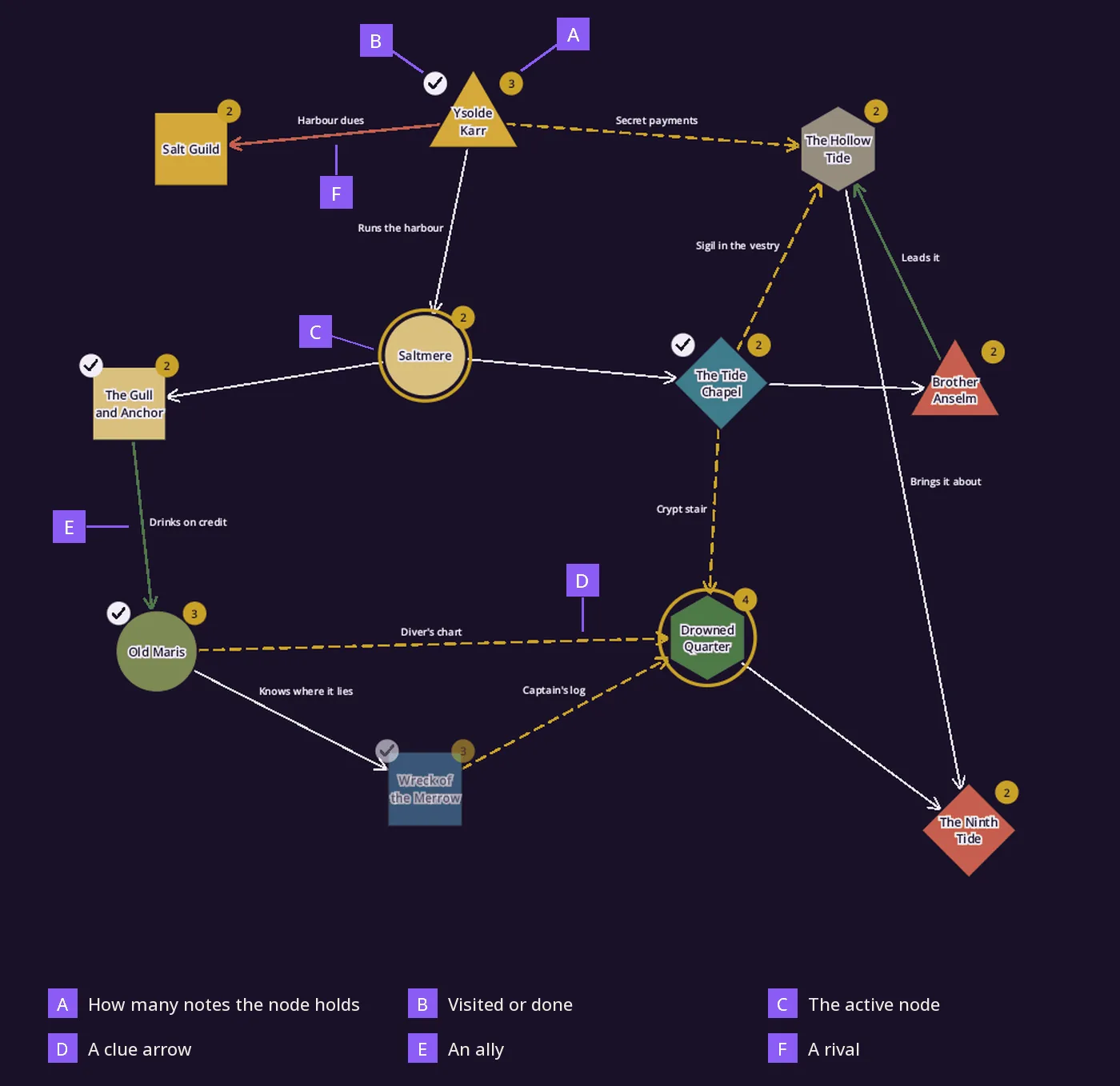 The Drowned Bell's board, and what its marks mean.
A node's page
Tap a node and its page opens. The Drowned Quarter's main page reads: "Thirty years under the estuary. Doors still shut, shop signs still hanging." Under it come the node's notes, each with its kind, its date and its tags, and at the foot a line for a quick note, with a button for the note's kind beside it. While a session runs, everything you write there joins the session.
 A quick note, written on the Drowned Quarter's page.
Tap a note and it opens full screen. The pencil switches it to writing, with a bar for headings, bold, italic, lists, checkboxes, undo and redo, and the eye switches it back to reading. The note saves itself as you type. Above it are the note's title, its kind, Move, which sends it to another node, and Details, for its tags and an in-game date such as "Seventh day of the Thaw". The name of any node on the board becomes a link when you read a note that names it, and the node's page lists every note that does, under Named in.
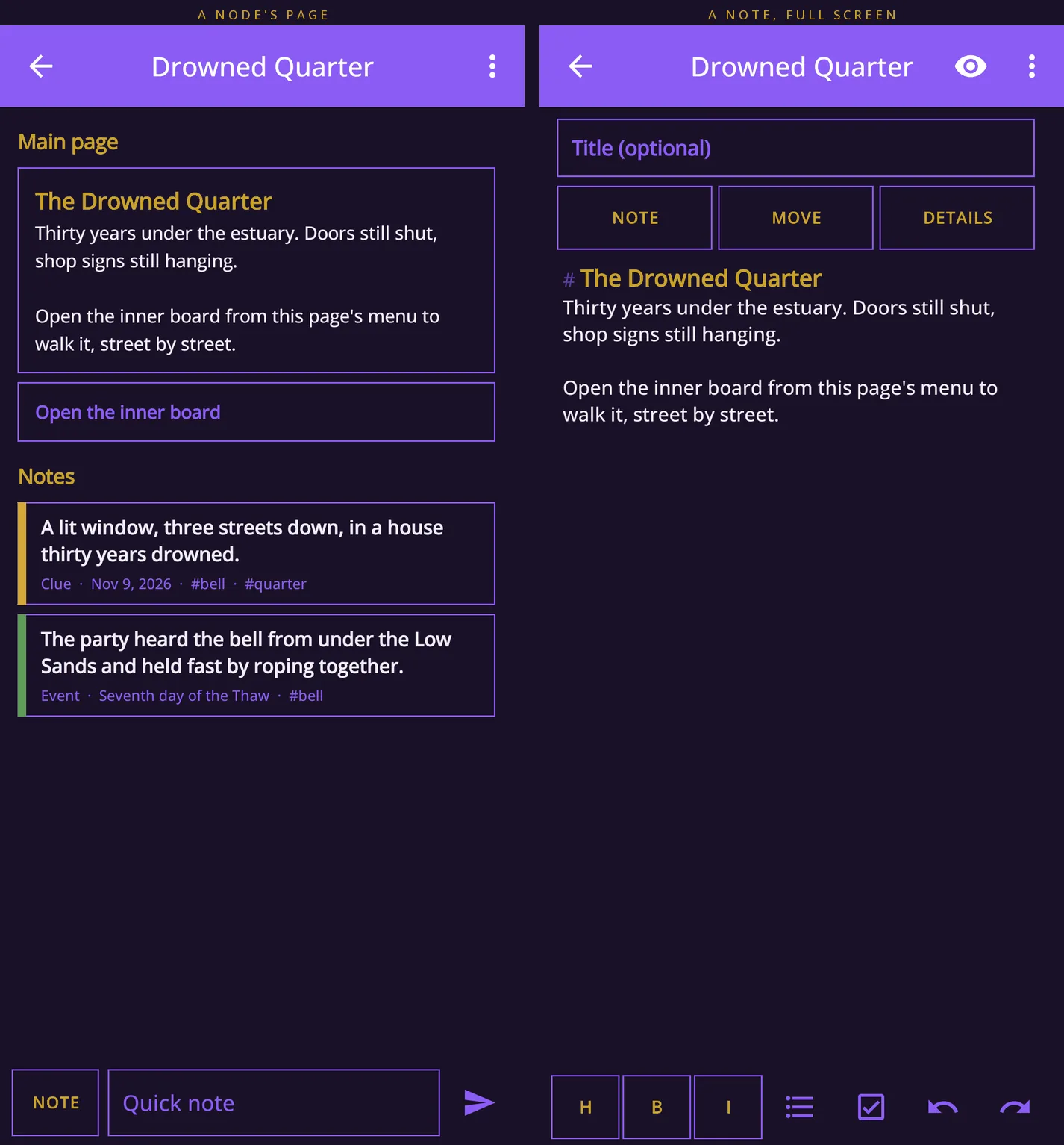 A node's page, and a note open full screen.
A note can also start from one of six templates, and Roll a generator lets you roll anything the app makes from inside a note. Whatever you save to favourites during the roll comes back attached to the note.
The journal drawer
The drawer, behind the bookmark at the top of the board, lists every note on the board, the last changed first. The Drowned Bell has 29. Filters narrow them by kind (note, clue, secret, thread, event or loot), whether they are open or done, tag, node colour, node and session, and Show on board dims every node that holds none of the notes left in the list. Filtered to clues, the Drowned Bell's list comes down to five, and Show on board picks out the five nodes that hold them.
 The drawer, filtered to clues, and the clues shown on the board.
You can save a set of filters to use again, and the Pinned tab keeps the favourites you have pinned to the board. Jot, beside Fit on the board, takes a quick note without choosing a node, and keeps it in Loose notes until you file it. A note you delete goes to the Trash, and a node you delete leaves its notes in Loose notes.
Sessions and the clue ledger
Sessions in the board's menu starts a session, and while it runs a gold bar on the board says so. Every note you write joins it. A finished session's recap gathers its notes node by node. In The Drowned Bell, Session 2's recap begins with Brother Anselm: "Event: He asked Hob for the names of everyone staying at the inn." Copy recap puts the whole recap on the clipboard.
The clue ledger counts clue arrows. Its hint says: "Make an arrow a clue arrow to count it. A place the clues lead to should have three, in case the party misses one." In The Drowned Bell, the Hollow Tide has two of three, and the ledger lists the clues the party has not found yet, each with the node it waits at.
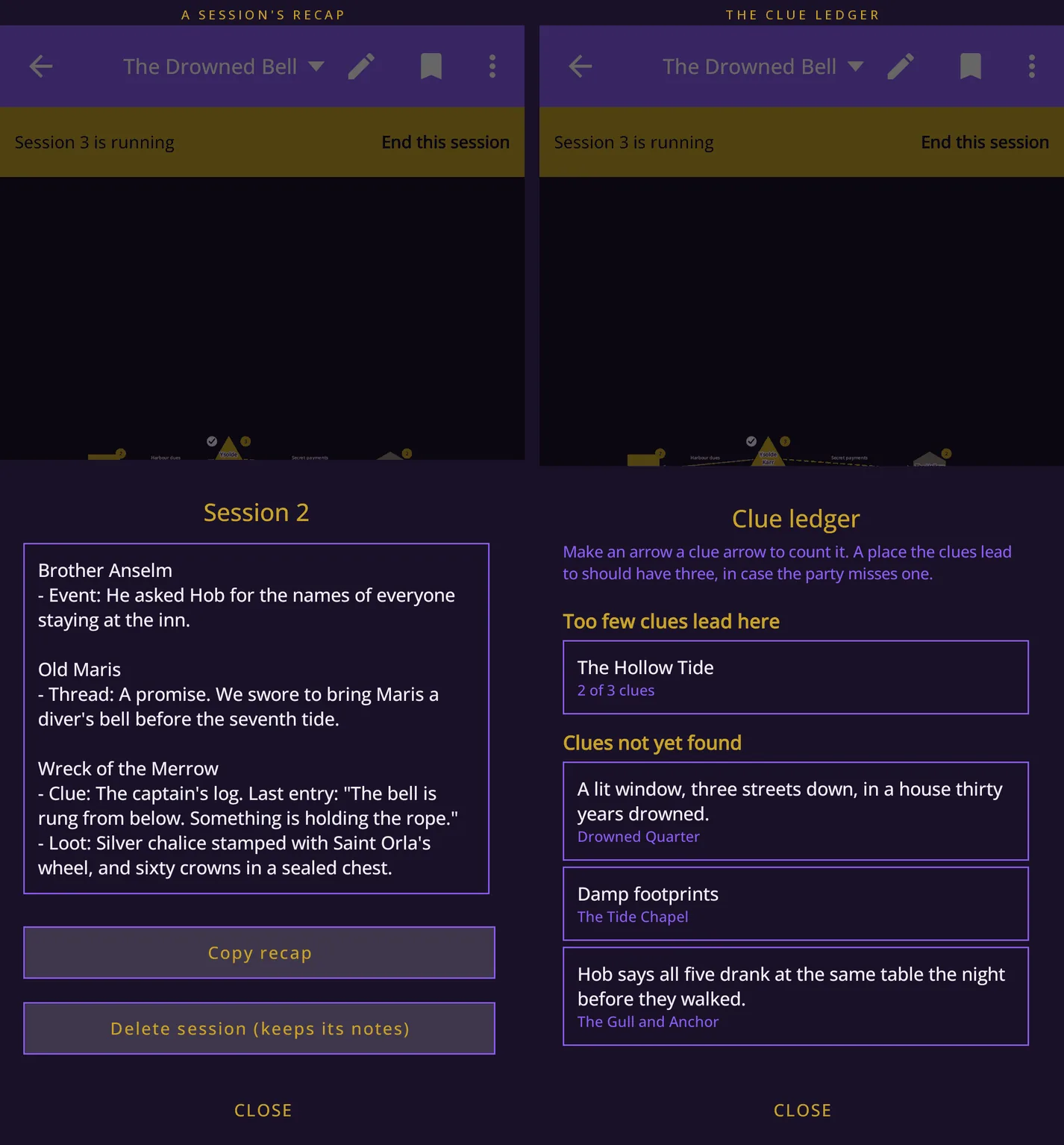 A session's recap, and the clue ledger.
To make an arrow a clue, turn on Edit, tap the arrow and choose its kind: plain, clue, ally or rival. The same sheet gives it a label. A node's story state (active, visited, done or hidden from players) is set from the node's Edit sheet.
A board inside a node
A node can open a board of its own. The Drowned Quarter's main page has a link, Open the inner board, which opens The Drowned Quarter (inner): four places on its streets, from the Flooded Stair to the Reliquary, with arrows of their own. Back returns to the main board.
 From a node, into its inner board, and back.
What your players see
Player view, in the board's menu, shows the board as your players may see it: hidden nodes, secret notes and the notes you have not marked for players are left out, and a bar says "Player view: secrets and hidden nodes are off". Each note has a switch for whether players can read it.
Export this board offers three things. File is the whole board in one file, inner boards and attached favourites included, "to keep safe or import on any phone". GM page and Players are web pages of the board and its notes. The GM's has every secret; the players' is written "without secrets, hidden nodes or notes you have not shown". Neither page can be imported, and Import a board brings a board file back in as a new board.
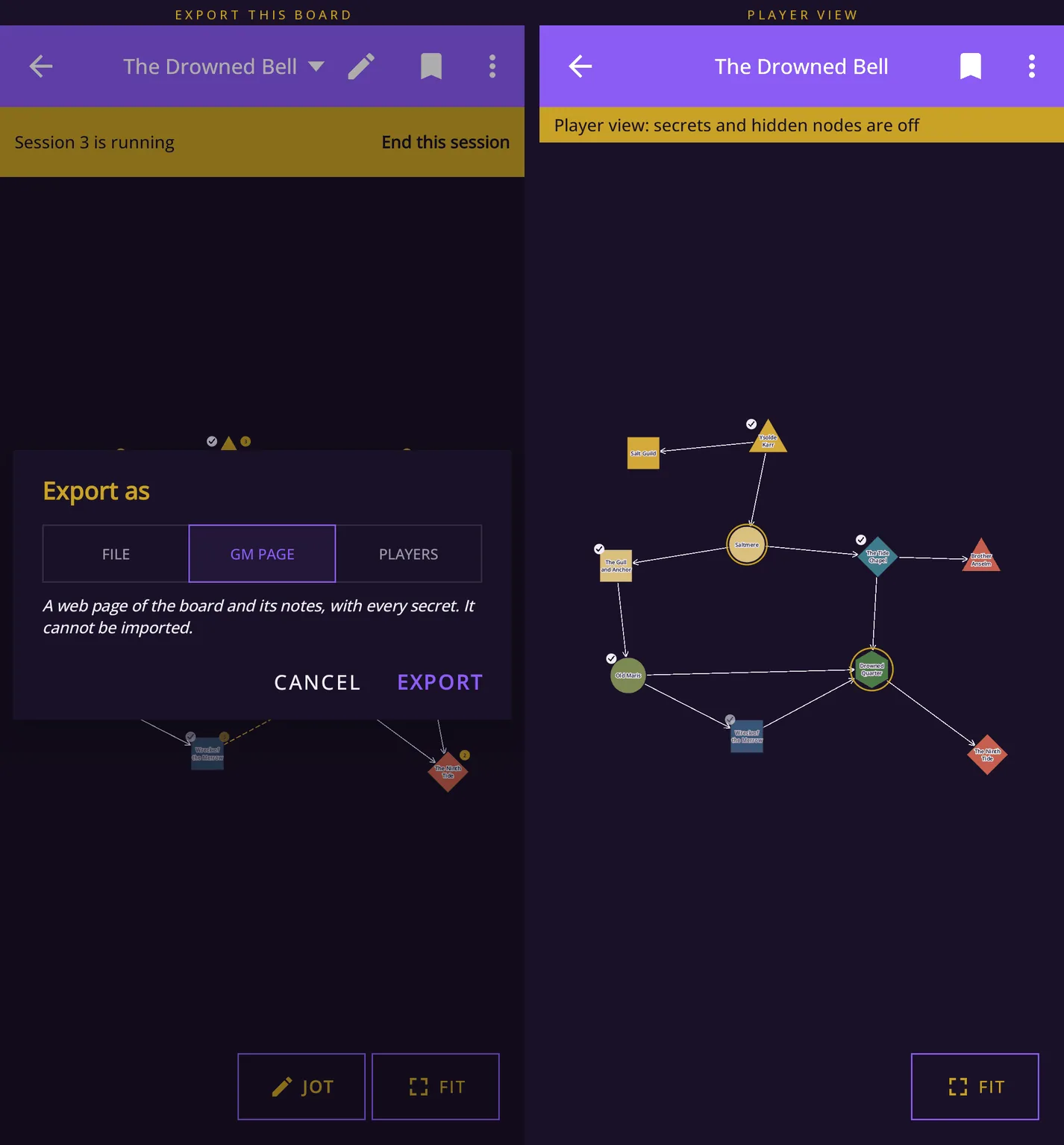 Export this board, and the player view.
Here are the two web pages of The Drowned Bell, opened in a browser on a PC. The GM's page has the Hollow Tide, a node hidden from players, with the arrows that lead to it, every arrow's label and all of the notes. The players' page has the board without the Hollow Tide or the labels, and only the notes marked for players.
 The GM page and the players' page of the same board.
The Names, Rebuilt
The eight name generators and Your Seed now share one list. A screen opens with ten names, or 25 or 50. Tap a name to open it on its parts, and each part has its own lock: what is locked stays, and Generate rolls the rest. In Invented Full Names, locking a surname offers On every row, which puts it on every name in the list, so one roll gives a whole family. Every generator works in fantasy, sci-fi and 1920s horror, across 32 peoples, and a line under the generator says which filters are on.
 Ten names, one surname locked, and On every row.
The Name Sheet is a new tool under Names & Characters, for the names you need at the table. Pick the peoples, and it lists a dozen names for each, or six or eighteen if you choose. Tap a name to cross it off once it is used, and the pencil beside it notes who it became. The sheet keeps itself between visits, so the names you crossed off are still crossed off next session, and it saves as a favourite that opens back in the tool.
 Crossing off a name, and noting who it became.
Names you saved to favourites now open. You can edit one, add a note to it, or open it in its generator on the first row, with every part locked.
The Fantasy Map, Drawn
New Fantasy Maps are now drawn the way the Map Maker's hand-drawn styles are. Mountains stand where the world has its peaks, with hills around them, woods have clearings, rivers widen from their spring to the sea, roads join the towns over easy ground, and the seas, lands, ranges, towns and rivers are named. Here is one map in Classic and in the new drawing.
 One map, Classic and Drawn.
Names never sit on a town, a river, a road or each other. The ones that do not fit on the whole map wait for a closer zoom: on this map, Highwatch, Goldcrag, Crow Wolds and Bell Hills appear as you zoom in. The steps below are the Fantasy Map's own drawing of this map at each zoom.
 More names as the map gets closer.
Drawn and Classic are a choice in Filters, and a new map is Drawn. Parchment and Colour are the drawing's two looks. Edit in Map Maker takes the map over as it is drawn, names included, and the export draws it at full size.
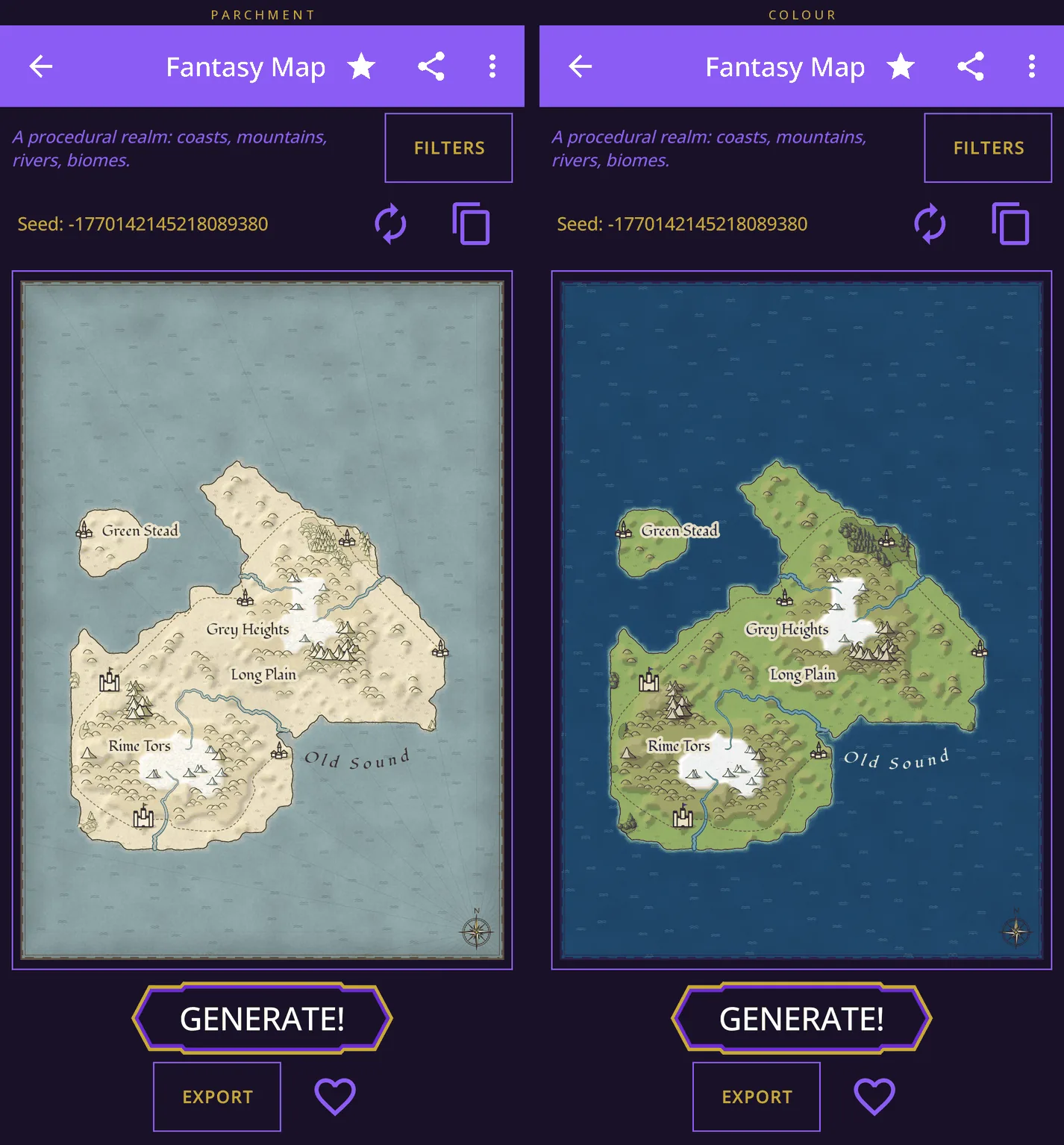 Parchment and Colour.
Smaller Things
- Colours: every tool now uses one colour for each kind of text: dark labels, gold values, names and headings, and purple check box words. The dropdowns that still showed Android's own look now match the app.
- What's new: 4.39.1 has its own tab beside the three before it.
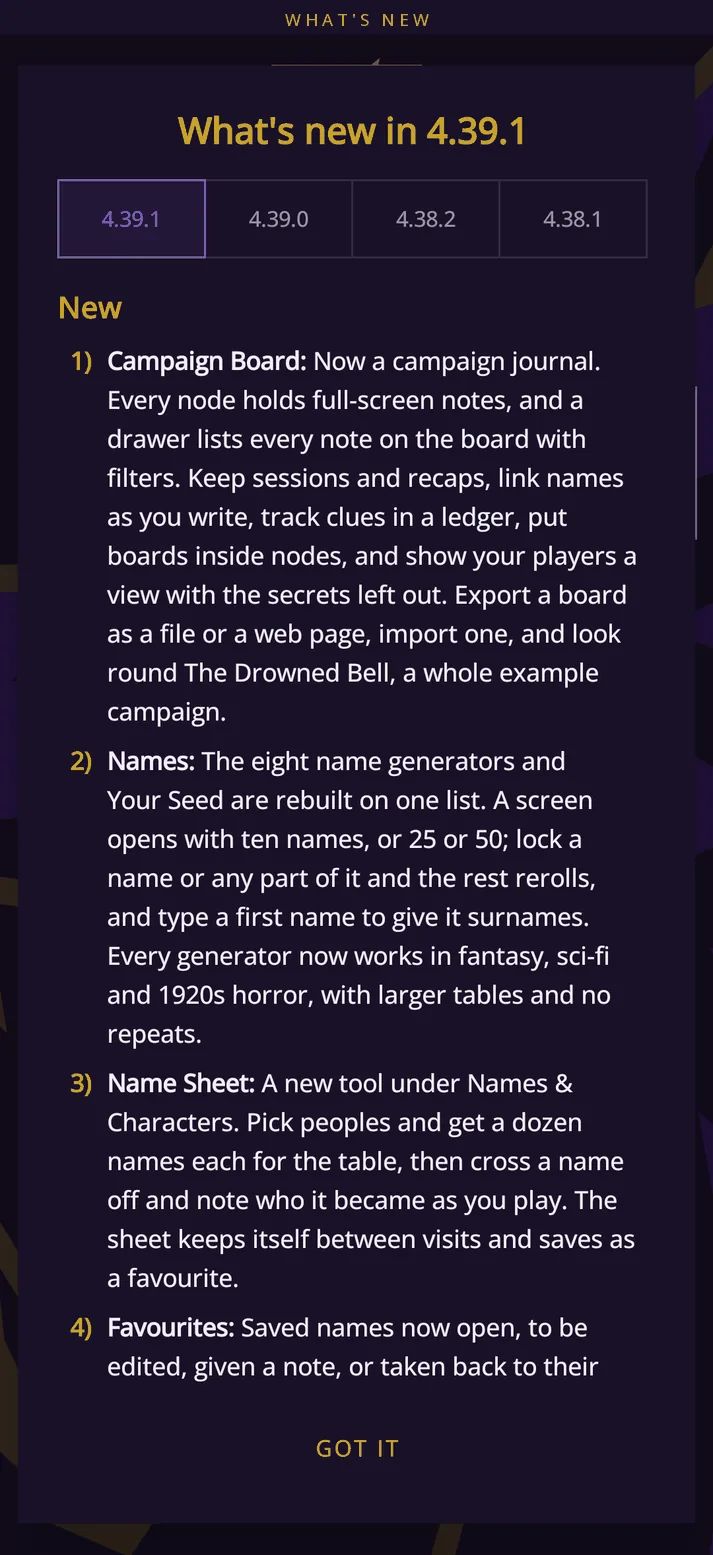 What's new for 4.39.1.
The Full Notes
Here is the list, word for word as the app shows it.
4.39.1
New
1) Campaign Board: Now a campaign journal. Every node holds full-screen notes, and a drawer lists every note on the board with filters. Keep sessions and recaps, link names as you write, track clues in a ledger, put boards inside nodes, and show your players a view with the secrets left out. Export a board as a file or a web page, import one, and look round The Drowned Bell, a whole example campaign.
2) Names: The eight name generators and Your Seed are rebuilt on one list. A screen opens with ten names, or 25 or 50; lock a name or any part of it and the rest rerolls, and type a first name to give it surnames. Every generator now works in fantasy, sci-fi and 1920s horror, with larger tables and no repeats.
3) Name Sheet: A new tool under Names & Characters. Pick peoples and get a dozen names each for the table, then cross a name off and note who it became as you play. The sheet keeps itself between visits and saves as a favourite.
4) Favourites: Saved names now open, to be edited, given a note, or taken back to their generator with every part locked.
5) Fantasy Map: New maps are drawn in the Map Maker's hand-drawn style, with mountain ranges and their hills, woods, rivers that widen to the sea, roads between the towns, and names for the seas, lands, ranges, towns and rivers. More names appear as you zoom in. Choose Drawn or Classic in Filters; maps you saved before keep their look.
Fixed
1) Names: A Starts filter set in one generator no longer narrows the others, and Ends and Length now read the name alone, not its epithet.
2) Your Seed: It now learns only from the names of people, not from taverns, spells or rumours.
3) Colours: Labels, values, names and headings now use the same colours in every tool, and the dropdowns that showed Android's own look now match the app.
Your Saves Are Safe
Every favourite, preset, note, campaign, map and setting you already have opens and looks the way it did before. Your boards keep every node, arrow and attachment, and each node's old note becomes its main page, with nothing lost. Names, presets and the Seed read as they did. Fantasy Maps you saved before keep their classic look, and a map you keep in Classic saves exactly as it always has. Wherever a tool now draws or writes differently, the difference shows only in what you make next.
Version 4.39.1 is free on Google Play now.
Download Fantasy World Generator
A board that keeps the whole campaign, and a map that names itself.